Relay Host · Customer-owned infrastructure

One Host. A clean Relay Cell for every customer.

Operate up to ten complete Relay instances on one machine you control. Each Cell keeps its own state and recovery lineage. You keep the infrastructure, data, keys and bill.

See what is already proven

1

customer-owned Host

One machine or VM under the operator’s control

10

managed Relay Cells

Running, stopped and retained Cells count

0.45.2

portable Host release

npm Host, checked playbook and signed Cell image

Choose the infrastructure you control

Run Relay Host in your cloud account.

Relay Host is not tied to DigitalOcean. Bring a compatible Linux VM from your preferred hyperscaler, neocloud or private infrastructure, subject to the documented machine contract. If you want the lowest-ambiguity starting point, use the first provider-specific path Orionfold has reproduced end to end.

Portable contract

Bring a compatible Linux VM

Keep your provider account, bill, DNS, TLS and credentials. Relay supplies checked, release-matched preparation and a receipt path without putting product secrets into cloud user-data.

Check the portable VM contract
Provider-verified

Relay 0.44.9 receipt

Follow the DigitalOcean reference path

Use the current reproduced Ubuntu topology when you value a dated provider receipt over adapting the portable contract to infrastructure your organization already prefers.

Read the verified guide

Portable: a compatible VM can be evaluated against one release-matched machine contract.

Provider-verified: Orionfold has a dated receipt for an exact provider topology.

Not yet provider-verified: no provider-specific promise until its own receipt passes.

The managed journey

Placement to handoff, with every gate visible.

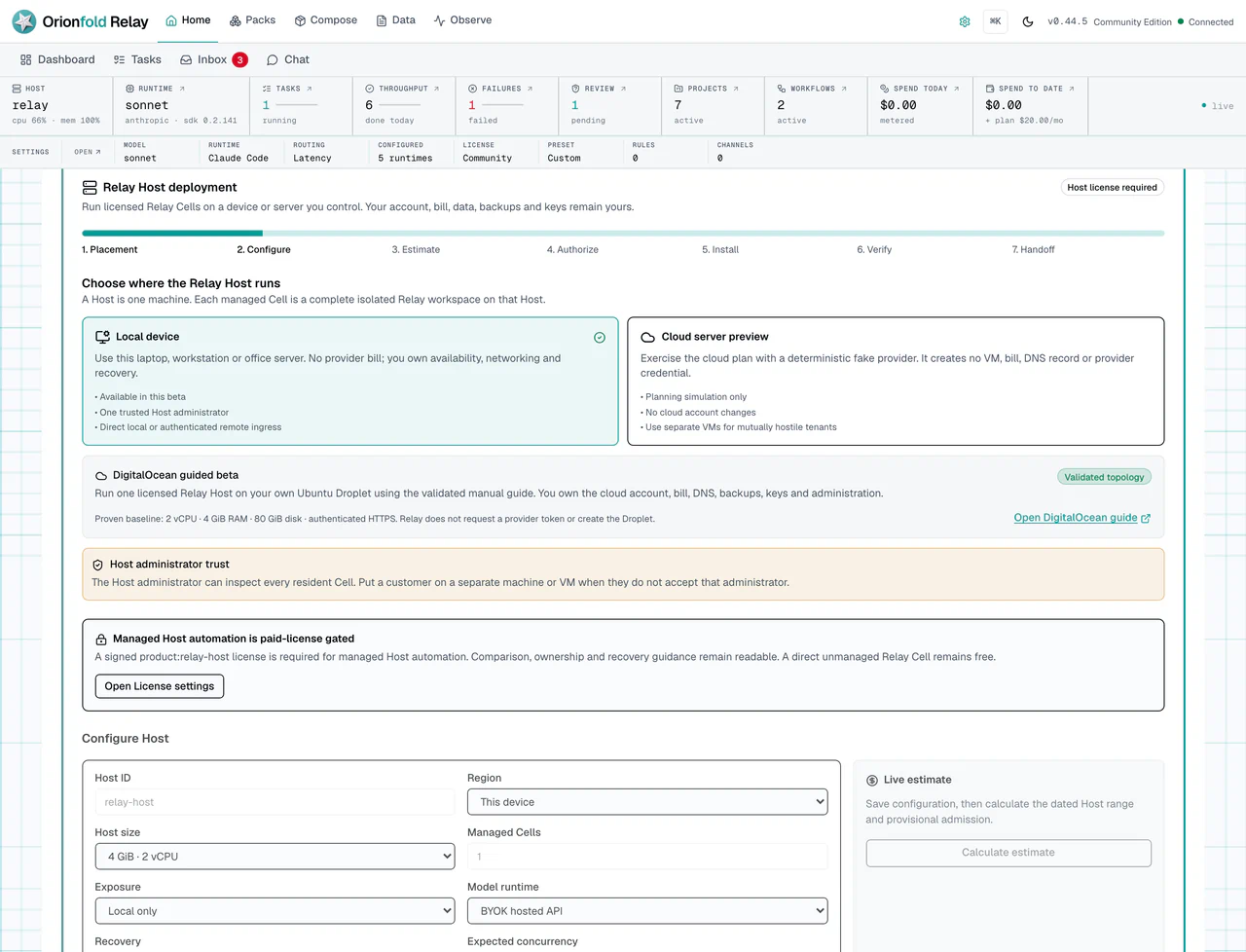
Relay turns managed deployment into seven named steps: placement, configuration, estimate, authorization, install, verification and handoff. The local path and one customer-owned DigitalOcean guided beta are proven. Relay's in-app Cloud Server Preview remains a planning simulation, not provisioning.

Read the operator guide →
Relay Settings showing the seven-step Host deployment journey, local device placement, cloud server preview, Host administrator trust warning, license gate and Host configuration fields.
Host deployment capture from the accepted beta train · current public release: Relay 0.44.9

The boundary you are buying

A folder organizes work. A Cell carries its own operational life.

01

A Cell is not a folder

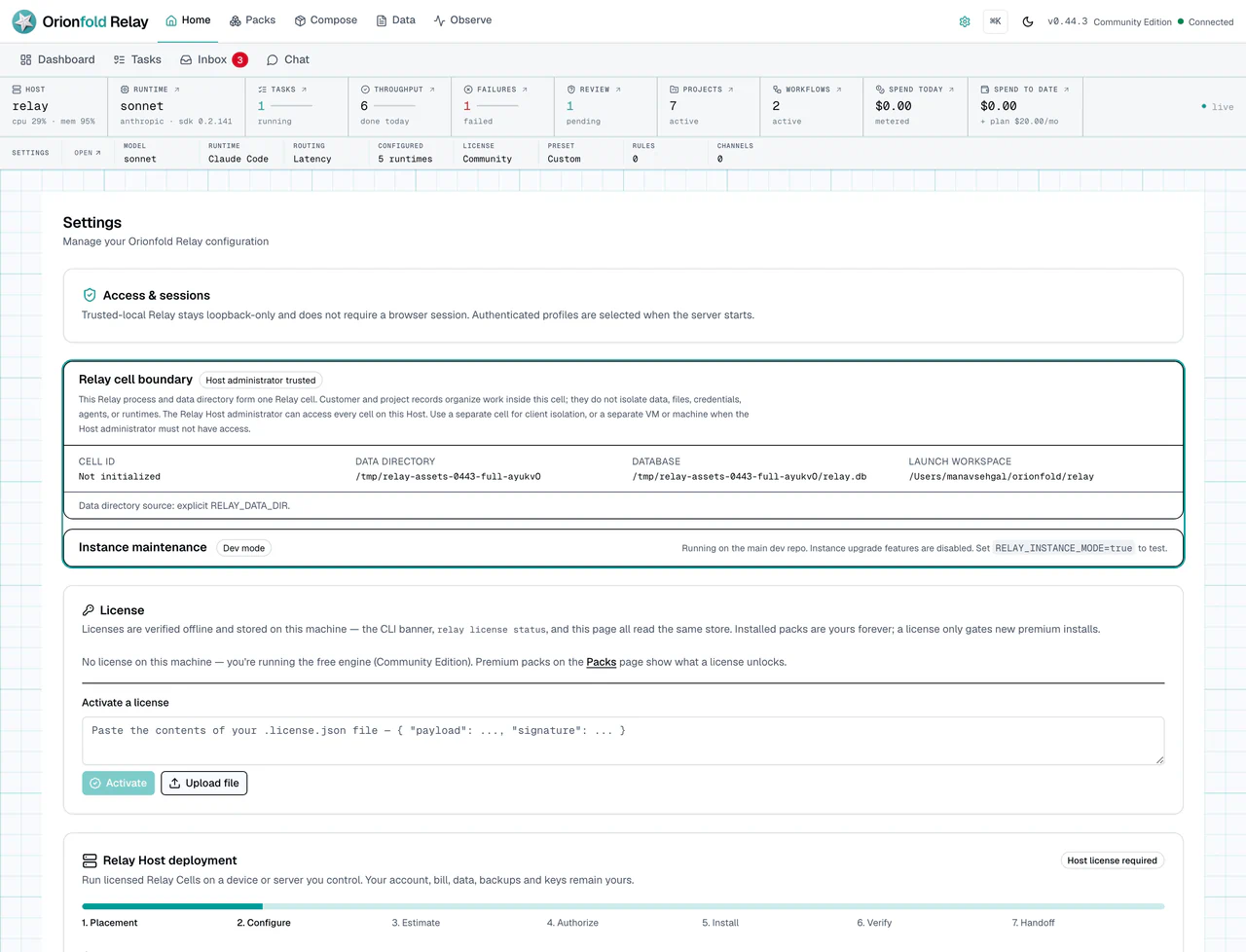
Each managed Cell is a complete Relay instance with its own database, files, identity, secrets, logs, limits and recovery lineage. Projects and customer records organize work inside a Cell. They do not isolate it.

02

The Host administrator is trusted

Cells on one Host have separate application state, but they share the machine and its administrator. Put a customer on a separate VM or machine when that administrator must not have access.

03

The supervisor stays local

One Host Supervisor controls only the Cells on its own machine. It is not a Fleet Controller and it does not reach into remote Hosts.

Relay Settings showing that one Cell has its own identity, data directory, database and workspace, with a clear Host administrator trust boundary.
Relay reports the Cell id, data root, database and Host-administrator boundary as facts, not marketing labels.

Three proofs, never conflated

Paying, downloading and trusting the bytes are separate decisions.

01

Commercial license

May this operator use managed Host actions?

A signed offline license carries the Host grant, term, owner and capacity. It is not a login session or a Docker password.

02

Cell image authenticity

Did Orionfold build these exact bytes?

The Host pulls the public Cell image by immutable digest and verifies the signed release identity, attestation and software inventory.

03

Registry access

May this machine download the image?

The primary GHCR image is public, so it needs no purchase token. A customer mirror can use its own scoped registry credential.

Relay Core and the public Cell image remain free. Relay Host is the signed authority to create and operate Cells through the Host Supervisor within the limits you bought. Premium Packs remain a separate right.

Customer Cell access · Guided beta

Give every customer a separate Cell—with the trust boundary stated plainly.

Per-customer authenticated browser access is available now through operator-configured access. One-click invitations, automatic DNS or reverse-proxy setup, multiple user roles and SSO are not. Same-Host Cells trust the Host administrator.

Can I give each of my customers their own Relay workspace?

Yes. Create a separate managed Relay Cell for each customer. A Cell is a complete Relay instance with its own database, files, identity, secrets, settings, logs, limits, authenticated browser access, backups and recovery lineage. It is more than a customer record or folder inside a shared Relay application.

How does my customer open their Cell?

Give the Cell a dedicated HTTPS address, such as customer-name.relay.example.com, or an equivalently isolated path configured by the Host administrator. The public route must map only to that Cell’s loopback-only service port through an authenticated TLS ingress. Cell ports, Docker, databases and model-runtime ports must not be exposed directly.

The current DigitalOcean guided beta leaves hostname, DNS, TLS, firewall and reverse-proxy configuration with the Host operator. Relay does not ask for your provider token or create those resources for you.

How does the customer create their login?

The Host operator generates a single-use bootstrap credential for that Cell. It is valid for 15 minutes and should be transferred to the intended customer through a separate trusted channel. The customer opens the Cell’s HTTPS address, enters the credential, creates the first administrator password and saves the eight recovery codes shown once.

Relay stores digests rather than the clear bootstrap credential, password, session tokens or recovery codes.

Does the customer need to install Relay?

No. A customer using a managed Cell normally opens it in a web browser. The Relay Host operator installs, updates, monitors, backs up and recovers the Host and its resident Cells.

Can more than one person use the same customer Cell?

The current access model has one built-in administrator credential per Cell. That administrator can sign in from multiple named browser sessions. Sessions last 12 hours, are independently visible and can be revoked.

Relay does not yet provide separate named users, role-based permissions, customer invitations, SSO or organization membership inside one Cell. Multiple browser sessions are not multiple user accounts.

Can one customer see another customer’s Cell?

Not through Relay’s normal application or ingress routing. Each managed Cell has its own application state, data root, secret root, private network, loopback port, identity, authentication store and recovery chain. Relay also rejects browser-supplied customer, Cell, session and forwarded-identity headers; a caller cannot select another Cell by changing a header or URL.

This is operational isolation, not protection from the Host administrator or the shared machine’s failure boundary.

Can I, as the Host administrator, access a customer’s Cell?

Yes. The Host administrator remains trusted. They control the machine and runtime, can inspect resident Cell storage, create the initial first-administrator bootstrap credential before access is configured and operate infrastructure recovery. Containers do not make the Host administrator unable to access customer data. Relay refuses a second bootstrap after the Cell administrator has been configured.

Make this trust relationship clear before onboarding a customer. Relay Host is customer-owned managed infrastructure, not a hostile-tenant SaaS boundary.

When should a customer receive a separate Host instead of a Cell on mine?

Use a separate Host, VM or customer-controlled server when the customer:

  • must not trust your Host administrator;
  • requires a separate infrastructure or legal-administration boundary;
  • cannot share the physical failure domain with another customer; or
  • needs a security or compliance promise beyond the supported same-Host model.

Changing folders, ports or container labels does not solve an administrator-trust requirement. Change the Host boundary.

Is customer onboarding automatic?

Not yet. In the guided beta, onboarding is a guided manual setup. The Host operator:

  • creates and starts the managed Cell;
  • assigns a stable HTTPS hostname or path;
  • configures the TLS reverse proxy to map that route only to the Cell’s loopback port;
  • generates the Cell’s short-lived first-administrator credential;
  • hands the credential to the customer through a trusted channel; and
  • confirms login, recovery-code custody, session visibility and backup policy.

Relay’s current Settings and Host Supervisor manage Cell lifecycle and capacity, but they do not yet automate DNS, TLS routes, invitation delivery or the complete customer-access handoff.

What happens if a customer loses their password?

The customer can use one of the Cell’s recovery codes. Recovery changes the password, rotates all remaining recovery codes and revokes every existing browser session. If the customer loses every recovery code, Relay does not allow the Host administrator to issue another first-administrator bootstrap credential over the configured account. Recovery must instead use the customer-owned encrypted Cell recovery material or a separately supported operator recovery procedure; do not delete or edit the authentication database to bypass this boundary.

Browser recovery codes are not Cell disaster-recovery keys. The operator must separately configure encrypted Cell backup and Host-loss recovery.

What happens when I stop managing a customer?

Stopping or retaining a managed Cell does not release its licensed capacity. Before ending service, create and verify an encrypted recovery export. Then either:

  • export and release the Cell, preserving the verified recovery artifact and freeing the managed-Cell slot; or
  • permanently purge the Cell after explicit confirmation when retention is no longer required.

Existing Cells and recovery remain available if a Host license lapses, but the operator cannot create additional managed Cells without valid capacity.

How many customers can one Relay Host serve?

The launch Relay Host entitlement covers one Host with up to ten managed Cells. Running, stopped and retained managed Cells count toward that limit. Exported-and-released and permanently purged Cells do not. A Cell should map to one customer organization unless that organization intentionally shares one administrator and operational boundary.

Is this the same as Orionfold hosting Relay for my customers?

No. Relay Host runs on infrastructure owned or controlled by you or your customer. You own the server account, infrastructure bill, DNS, TLS, firewall, model credentials, backups, recovery keys and administration. Orionfold supplies Relay software, the signed Cell image, the licensed managed-Host authority, updates and support within the documented topology.

Where can I find the setup instructions?

Use the guide that matches your installed Relay release. For the current guided-beta release, use these version-matched Relay 0.44.9 guides. Do not substitute an unversioned or third-party routing recipe for the release-matched trust and ingress contract.

The operator path

From one machine to ten named customer Cells.

Admission happens before Relay allocates a port, path, volume, network or customer state. At capacity, the eleventh Cell is refused without disturbing the first ten.

  1. 01

    Choose placement

    Run locally or follow the manual DigitalOcean guided beta on a customer-owned Ubuntu server. Relay never asks for your provider token.

  2. 02

    Configure the Host

    Set Host identity, machine shape, managed Cell count, exposure, model runtime and recovery posture.

  3. 03

    Review the estimate

    Relay calculates a dated resource and provider range. Any material change clears stale approval.

  4. 04

    Authorize the exact plan

    A signed Host license and explicit operator confirmation are required before a managed mutation.

  5. 05

    Install and verify

    npm supplies Relay and Host control. The Host pulls and verifies the compatible public Cell image by digest.

  6. 06

    Create customer Cells

    Each opaque Cell id gets its own data root, private network, loopback port, limits and lifecycle receipts.

  7. 07

    Handoff and recover

    Keep encrypted recovery outside the Host. Export, verify and restore without depending on Orionfold infrastructure.

Accepted customer-owned cloud proof

One DigitalOcean Host is proven. The claim stays that narrow.

Relay 0.44.9 passed a fresh guided-beta run on one customer-owned Ubuntu 24.04 x64 SFO3 Droplet with 2 vCPU, 4 GiB RAM and 80 GiB disk. Authenticated HTTPS, first-admin setup, ten managed Cells, eleventh-Cell refusal, same-Host isolation, a private model runtime, encrypted recovery, restart, rollback and export all passed.

The run lasted about 18 minutes at a $0.03571/hour compute rate and remained conservatively below $0.05, subject to provider billing lag. Cleanup removed the Droplet, volume, reserved IP, firewall, disposable SSH key, provider token and local credentials; final provider inventory was empty. This is a proof-run cost, not a monthly sizing or operating-cost promise.

Run the DigitalOcean guided beta →

Still not claimed

  • One-click or in-app infrastructure provisioning
  • Equivalent live receipts on providers beyond the tested DigitalOcean topology
  • A universal machine size, monthly cost or local-model throughput
  • Hostile-administrator isolation
  • Multi-Host Fleet control
  • Uptime, recovery-time or service-level promises
  • Managed Orionfold infrastructure

Relay Host license

One Host. Ten managed customer Cells.

Buy the signed, offline-verifiable right to create and operate customer Cells through the Relay Host Supervisor. Relay Core and the public Cell image remain free. Premium Packs stay separate.

Capacity
1 Host · 10 managed Cells
Delivery
Signed license by email · offline verification
Updates and support
Forward Host updates · email support · no response-time SLA
Refund
14 days · same-licensee replacement only
Already purchased? Email a fresh license link

Questions before you choose

The plain answers.

Is Relay Host hosted by Orionfold?

No. The Host runs on infrastructure you or your customer controls. Orionfold sells the signed managed-use right and Host updates, not a hosted service or uptime promise.

Do I pay to download Relay or the Cell image?

No. Relay Core, direct use and the public signed Cell image remain free. The paid right is managed Host lifecycle within signed capacity.

Are ten Cells ten hostile tenants?

No. Each Cell has independent application state and lifecycle, but same-Host Cells still trust the Host administrator and share the machine failure boundary.

What happens when the annual term ends?

Existing Cells keep running and remain startable, stoppable, exportable, recoverable and purgeable. New managed capacity and forward paid updates stop. Compatible critical-security fixes remain included.

Are premium Packs included?

No. Packs are maintained application content and remain a separate license. Relay Host covers Host authority and managed Cell capacity.

Is DigitalOcean deployment available now?

Yes, as a guided manual beta on a customer-owned Ubuntu server. You create and administer the server, firewall, DNS, TLS, backups, recovery keys and bill. Relay does not provision or operate it for you.