Fictional discovery study · one primary need per person.
Approval records still lead this small, biased sample. The chart updates its numbers; the interpretation remains yours.
SELECTED PART
Needs chart
−3
+4
The original and applied values for this part. Reverting restores its original value.
↳Your source stays beside the document.
Inspect the Jobs, then make one change.
Interactive illustration based on Flow’s bundled Customer Research documents. Changes stay in this demo.
Free Base · 10 Pro Days · No credit cardNative to your MacReadable Markdown filesReceipted. Reversible.
JOBS ARE PART OF THE DOCUMENT
SEE THE WORK. MAKE THE CALL.
A research brief can carry its own Jobs. Inspect the saved Job, trace its declared inputs and outputs, and run a sample update.
When the page changes, review one part at a time. Keep records your decision. Revert restores that part. Later leaves it applied, ready for your return.
INTERACTIVE PRODUCT WALKTHROUGH
Research BriefFlow 1.7
Customer Research.md
Research Brief
A small study. A clearer next question.
Fictional discovery study · one primary need per person.
Approval records still lead this small, biased sample. The chart updates its numbers; the interpretation remains yours.
SELECTED PART
Needs chart
−3
+4
The original and applied values for this part. Reverting restores its original value.
↳Your source stays beside the document.
Inspect the Jobs, then make one change.
Interactive illustration based on Flow’s bundled Customer Research documents. Changes stay in this demo.
Try the walkthrough: add interview I12, run Research Refresh, then inspect the changed table and chart. Sample data from the included Customer Research documents.
YOUR WORK HAS TWO RHYTHMS
WITH YOU. WHILE YOU REST. ALWAYS WITHIN SCOPE.
During the day, inspect each Agency proposal before it changes your document. At night, a standing job refreshes the parts you declared.
Return to marked changes. Keep what helps, or restore a part.
Two rhythms. Your boundaries.FLOW / ILLUSTRATION
WITH YOU Daytime Agency
01Select a passage
02Inspect the exact diff
03Approve or decline
04Save + receipt
WHILE YOU REST Standing Night Shift job
01Set sources + limits
02Refresh declared parts
03Morning Briefing
04Keep or revert a part
A daytime proposal waits. A standing job acts within permission you already gave.
01 / Choose the scope02 / Inspect the work03 / Make the decision04 / Keep a trace
Night Shift runs while your Mac is plugged in and idle, with Flow open or quit. A missed window can catch up once on wake.
THE FREE EDITOR IS A REAL WORKSPACE
WRITE. SEARCH. CHART. EXPORT. KEEP YOUR FILES.
Editor, Reader and Source views. A primary document and a Workbench for related work. Full-text and semantic search on your Mac. Editable tables, local pictures, 34 chart types and 20 diagram types, all in ordinary Markdown. Charts and diagrams render offline.
One cell changes. Surrounding Markdown stays intact.
LET THE NUMBERS SPEAK.
Research80%
Launch75%
Editorial50%
34 chart types. Rendered on your Mac.
SHOW HOW IT CONNECTS.
SourcesDefinition
TableChart
Review
20 diagram types. Readable fenced text.
Markdown data becomes an editable tableThe same numbers become a chartA readable definition becomes a diagram
IDEAS + DAYTIME AGENCY
NOTICE THE NEXT MOVE. CHOOSE THE CHANGE.
From a clearer sentence to a sourced expansion, Flow helps you improve the page in front of you. Inspect the scope, model, estimated cost and exact diff. Approve, decline, pause or stop.
Night Shift stays here. Overnight model work uses a local model.
A visible boundary. Selected text goes to your chosen provider when you run the action.
Smart Routing names the model and deciding rule. Public Web Lookups are a separate opt-in, off by default.
On this Mac / local model inferenceCloud / your configured API key
THE RESULT AND THE REASONS
READ THE ANSWER. OPEN THE RECEIPT.
See the run, model, locality, observed cost, checks and evidence. Follow a saved revision to its exact diff. Sources read and evidence assessed stay distinct; uncertainty stays visible.
01 / The revision02 / The route03 / The checks04 / The evidence
THE MORNING GETS TO THE POINT
WHAT MOVED. WHAT DIDN’T. WHAT NEEDS YOU.
A single Morning Briefing gathers changed documents and useful snapshots. Review marked parts without reopening every routine. An unchanged source can be a good night’s work.
A morning with a shorter listFLOW / ILLUSTRATION
MORNING BRIEFING
Good morning. Here’s what moved.
07:30
Review a part. Keep the result or restore that part. Later edits are protected from a blind rollback.
Keep your attention. An unchanged source does not need a fresh paragraph.
See the exception. An unreachable source is an explained problem, never invented evidence.
Changed / review the marked partsNo change / a useful quiet resultNeeds attention / an exception you can understand
MADE FOR THE WORK YOU DO
THE EVERYDAY DETAILS MAKE THE DIFFERENCE.
A search result returns to its passage. A table edit preserves the surrounding file. A receipt keeps the run inspectable. Living Documents build on that foundation.
Small details. A better working day.FLOW / ILLUSTRATION
Weekly brief.mdSAMPLE DOCUMENT
customer interviewsSearch
IN THIS FOLDER
Weekly brief.mdWhat we learned
Three customer interviews changed the order of our launch plan.
Research notes.mdQuestions for next week
Prepare the next round of customer interviews.
BACK TO THE PASSAGE
What we learned
Three customer interviews changed the order of our launch plan.
People wanted the source beside the answer. We moved document navigation ahead of another new template.
Interactive illustration · sample content · select a step to explore
01 / Find the passage, with its source in view.02 / Change one cell. Keep the surrounding Markdown.03 / Inspect the checks. A failed check stays a failed check.
Illustrated workflows with sample content. Explore the linked product tour for real Flow screenshots and the complete feature details.
Files, search and everyday editing
Ordinary folders and Markdown, including tables, footnotes, code blocks, images and wiki links. Full-text and semantic search use local indexes and return a source passage. Unsaved edits take precedence. Images keep ordinary file references. File name collisions are refused; deleted files go to Trash. See the complete document tour.
Long documents, checks and recovery
Long work is reviewed in ordered parts with range and coverage visible. Checks retain their actual state; an override does not turn a failure into a pass. History records revisions, exact diffs and restore points. Observed cost is distinguished from an estimate. Read the full technical specification.
INCLUDED WITH FLOW
24 USEFUL STARTING DOCUMENTS. YOUR NEXT CHAPTER.
Start with a responsibility you recognize. Explore four categories, inspect a document's Jobs, and make a copy for your own work.
START WITH USEFUL WORK
Make a Living Document yours.
FLOW 1.7 / INTERACTIVE ILLUSTRATION
5 featured of 24 documents
No document matches. Try another word or category.
Research & MarketsFEATURED
AI Personal Assistants Market Watch
Follow the assistant market through sourced signals, comparisons and research decisions.
INSIDE THIS EXAMPLE
Eight selected products and twelve dated primary-source cards give this example a research cohort. Compare the signals, keep publisher-described capabilities distinct from hands-on findings, and decide what merits attention.
In the document
Start here
Research question and scope
What merits attention
Market interpretation
Saved Jobs
Collect data
Watch sources
List a folder’s files
Expand with Sources
Look inside the folder
The document travels with its inputs and supporting files. A few from this example:
AI Personal Assistants Market Watch.md
Assistant Comparison Narrative.md
Assistant Market Inputs.md
Assistant Market Refresh.md
Assistant Research Playbook.md
COPY PREVIEW / READY TO INSPECT
AI Personal Assistants Market Watch copy
In Flow, you choose a folder on your Mac. The independent copy includes the document and its inputs and assets.
YOUR DOCUMENTAI Personal Assistants Market Watch.md
Replace the sample inputs with your work.
JOBS / NOT RUN4 saved steps
Inspect the scope in the Workbench before you run it.
Business & Teams
Business Review
Quarterly close, operating review and a decision pack from your own numbers.
INSIDE THIS EXAMPLE
The fictional full-year review reports $19.2M of revenue. Changing Q4 revenue from 5.7 to 6.0 raises the calculated annual total to $19.5M; the authored conclusions still need review.
In the document
Growth is healthy; the next decision is how to sustain it
The review pack
Saved Jobs
Collect data
Watch sources
Overnight notes
Look inside the folder
The document travels with its inputs and supporting files. A few from this example:
Business Review.md
Annual Review.md
Business Review Refresh.md
Decision Record.md
Quarterly Close.md
COPY PREVIEW / READY TO INSPECT
Business Review copy
In Flow, you choose a folder on your Mac. The independent copy includes the document and its inputs and assets.
YOUR DOCUMENTBusiness Review.md
Replace the sample inputs with your work.
JOBS / NOT RUN3 saved steps
Inspect the scope in the Workbench before you run it.
Learn Flow
Charts Gallery
Every chart and diagram Flow draws, driven from an editable table you own.
INSIDE THIS EXAMPLE
An editable four-row table drives a bar chart and a donut. Browse 34 chart forms and 20 Mermaid forms, with fictional teaching data and notes on reading each visual honestly.
In the document
Find the right form
Read the marks honestly
Saved Jobs
This entry is a reference. Explore its linked pages and examples.
Look inside the folder
The document travels with its inputs and supporting files. A few from this example:
Charts Gallery.md
Charts — Comparisons.md
Charts — Composition.md
Charts — Distributions.md
Charts — Goals and Plans.md
COPY PREVIEW / READY TO INSPECT
Charts Gallery copy
In Flow, you choose a folder on your Mac. The independent copy includes the document and its inputs and assets.
YOUR DOCUMENTCharts Gallery.md
Replace the sample inputs with your work.
JOBS / NOT RUNReference document
Start with the linked pages and their examples.
Research & Markets
Competitor Watch
Dated competitor observations, refreshed evidence and changes worth reviewing.
INSIDE THIS EXAMPLE
Keep dated competitor observations beside the decisions they inform. Named public sources can be refreshed; a changed source gives you something to investigate, without deciding the response for you.
In the document
This week's decision
Decision context
Evidence at a glance
Packaging lens
Saved Jobs
Collect data
Watch sources
List a folder’s files
Expand with Sources
Look inside the folder
The document travels with its inputs and supporting files. A few from this example:
Competitor Watch.md
Comparison Narrative.md
Competitors.md
Founder Briefing.md
Founder Decisions.md
COPY PREVIEW / READY TO INSPECT
Competitor Watch copy
In Flow, you choose a folder on your Mac. The independent copy includes the document and its inputs and assets.
YOUR DOCUMENTCompetitor Watch.md
Replace the sample inputs with your work.
JOBS / NOT RUN4 saved steps
Inspect the scope in the Workbench before you run it.
Interview coding, observations and the research questions they answer.
INSIDE THIS EXAMPLE
The fictional study codes eleven interviews. Add a twelfth interview with Portable files as its need: the calculated count becomes four. The small, biased sample does not estimate market prevalence.
In the document
Approval records are the leading coded need, within a small biased sample
What to do with the finding
Saved Jobs
Collect data
Watch sources
Overnight notes
Look inside the folder
The document travels with its inputs and supporting files. A few from this example:
Research Brief.md
Interview Register.md
Interview Synthesis.md
Market Hypotheses.md
Research Refresh.md
COPY PREVIEW / READY TO INSPECT
Customer Research copy
In Flow, you choose a folder on your Mac. The independent copy includes the document and its inputs and assets.
YOUR DOCUMENTResearch Brief.md
Replace the sample inputs with your work.
JOBS / NOT RUN3 saved steps
Inspect the scope in the Workbench before you run it.
Learn Flow
Using Flow
How Flow's tools, Jobs and the Night Shift work, page by page.
INSIDE THIS EXAMPLE
Ordinary text, tables, links and images remain readable in other editors. Flow’s chart, Mermaid and living-data blocks stay in the Markdown file; other readers may show their source.
In the document
Read, work and keep the result
Plain text, with structure
Saved Jobs
This entry is a reference. Explore its linked pages and examples.
Look inside the folder
The document travels with its inputs and supporting files. A few from this example:
Using Flow.md
Night Shift Handbook.md
Workspace Library.md
COPY PREVIEW / READY TO INSPECT
Flow Handbook copy
In Flow, you choose a folder on your Mac. The independent copy includes the document and its inputs and assets.
YOUR DOCUMENTUsing Flow.md
Replace the sample inputs with your work.
JOBS / NOT RUNReference document
Start with the linked pages and their examples.
Business & Teams
Health Evidence
Aggregate service counts and an operational evidence review.
INSIDE THIS EXAMPLE
Compare missed-appointment counts with their denominators in a fictional operational review. A downward series does not establish that a change to reminder wording caused the result.
In the document
Did the latest week change the question?
Read the rate alongside the count
Pool the underlying appointments, not the percentages
What the evidence can carry
Saved Jobs
Collect data
Watch sources
Look inside the folder
The document travels with its inputs and supporting files. A few from this example:
Health Evidence.md
Health Evidence Refresh.md
Health Evidence Settings.md
Health Evidence Sources.md
inputs/health-operations-2026-09-05.md
COPY PREVIEW / READY TO INSPECT
Health Evidence copy
In Flow, you choose a folder on your Mac. The independent copy includes the document and its inputs and assets.
YOUR DOCUMENTHealth Evidence.md
Replace the sample inputs with your work.
JOBS / NOT RUN2 saved steps
Inspect the scope in the Workbench before you run it.
Personal & MoneyFEATURED
Household Budget
Turn your spending inputs into current totals and a useful monthly review.
INSIDE THIS EXAMPLE
Two fictional statements contain 79 rows. The example keeps uncategorized spending visible and distinguishes a cash-flow surplus from a transfer to savings. It is a dated sample, not a bank connection.
In the document
The month at a glance
Categories against their budgets
The last months, stacked
How the month accumulated
Saved Jobs
Collect data
Watch sources
List a folder’s files
Overnight notes
Look inside the folder
The document travels with its inputs and supporting files. A few from this example:
Household Budget.md
Budget Profile.md
Budget Refresh.md
COPY PREVIEW / READY TO INSPECT
Household Budget copy
In Flow, you choose a folder on your Mac. The independent copy includes the document and its inputs and assets.
YOUR DOCUMENTHousehold Budget.md
Replace the sample inputs with your work.
JOBS / NOT RUN4 saved steps
Inspect the scope in the Workbench before you run it.
Renewal packet, quotation changes and the questions for your broker.
INSIDE THIS EXAMPLE
A fictional design studio keeps expiring premiums, quotations and missing documents together. A pending quote is not zero, and two prices do not establish equivalent protection.
In the document
Put the missing documents first
Compare the quoted prices without hiding the gap
Leave time for the conversation
Bring three questions to the broker
Saved Jobs
Collect data
Watch sources
Look inside the folder
The document travels with its inputs and supporting files. A few from this example:
Insurance Renewal.md
Insurance Renewal Refresh.md
Insurance Renewal Settings.md
Insurance Renewal Sources.md
inputs/insurance-snapshot-2026-09-05.md
COPY PREVIEW / READY TO INSPECT
Insurance Renewal copy
In Flow, you choose a folder on your Mac. The independent copy includes the document and its inputs and assets.
YOUR DOCUMENTInsurance Renewal.md
Replace the sample inputs with your work.
JOBS / NOT RUN2 saved steps
Inspect the scope in the Workbench before you run it.
Research & Markets
Diligence Brief
Management claims, missing evidence and the diligence questions that remain.
INSIDE THIS EXAMPLE
The fictional Larkspur Robotics memo asks whether sales can succeed beyond the CEO. Management claims, missing operating evidence and the next diligence questions remain separate.
In the document
Sales transferability is the first question to investigate
The memo is an argument to test
Saved Jobs
Collect data
Watch sources
Overnight notes
Look inside the folder
The document travels with its inputs and supporting files. A few from this example:
Diligence Brief.md
Diligence Refresh.md
Diligence Register.md
Larkspur Memo.md
COPY PREVIEW / READY TO INSPECT
Investment Research copy
In Flow, you choose a folder on your Mac. The independent copy includes the document and its inputs and assets.
YOUR DOCUMENTDiligence Brief.md
Replace the sample inputs with your work.
JOBS / NOT RUN3 saved steps
Inspect the scope in the Workbench before you run it.
Personal & Money
Job Search
Applications, next actions and evidence-based tailoring.
INSIDE THIS EXAMPLE
A fictional offer deadline falls before another interview. The tracker keeps both dates visible, alongside missing written terms and the resume used. No application or message is sent by this example.
In the document
The pipeline
The tracker
Prep
Resume versions
Saved Jobs
Collect data
Watch sources
List a folder’s files
Overnight notes
Look inside the folder
The document travels with its inputs and supporting files. A few from this example:
Job Search.md
Applications.md
Job Search Refresh.md
Priya Resume.md
resumes/Resume — Base Version.md
COPY PREVIEW / READY TO INSPECT
Job Search copy
In Flow, you choose a folder on your Mac. The independent copy includes the document and its inputs and assets.
YOUR DOCUMENTJob Search.md
Replace the sample inputs with your work.
JOBS / NOT RUN4 saved steps
Inspect the scope in the Workbench before you run it.
A factual chronology, a source index and the evidence still missing.
INSIDE THIS EXAMPLE
The fictional file contains arrival counts of fifty-five and sixty cartons. Preserve both with their source records until they are reconciled. The chronology prepares factual review; it does not settle the dispute.
In the document
Read the chronology, then the records
The evidence does not yet answer the central question
Packet completeness
Saved Jobs
Collect data
Watch sources
Look inside the folder
The document travels with its inputs and supporting files. A few from this example:
Legal Matter.md
Legal Matter Refresh.md
Legal Matter Settings.md
Legal Matter Sources.md
inputs/legal-snapshot-2026-09-05.md
COPY PREVIEW / READY TO INSPECT
Legal Matter copy
In Flow, you choose a folder on your Mac. The independent copy includes the document and its inputs and assets.
YOUR DOCUMENTLegal Matter.md
Replace the sample inputs with your work.
JOBS / NOT RUN2 saved steps
Inspect the scope in the Workbench before you run it.
Learn Flow
Living Document
Your own small recurring project, with the smallest useful Jobs.
INSIDE THIS EXAMPLE
A fictional onboarding plan allocates 400 of 500 available minutes across three items. Bound views follow changes to the plan and source note; the surrounding written assessment stays yours to revise.
In the document
The pulse
Work that earns its place in the plan
Context on file
Source inventory
Saved Jobs
Collect data
Watch sources
List a folder’s files
Overnight notes
Look inside the folder
The document travels with its inputs and supporting files. A few from this example:
Living Document.md
Profile.md
Starter Refresh.md
entries/Example Entry.md
COPY PREVIEW / READY TO INSPECT
Living Document Starter copy
In Flow, you choose a folder on your Mac. The independent copy includes the document and its inputs and assets.
YOUR DOCUMENTLiving Document.md
Replace the sample inputs with your work.
JOBS / NOT RUN4 saved steps
Inspect the scope in the Workbench before you run it.
Editorial calendar, campaign review and a draft announcement in one desk.
INSIDE THIS EXAMPLE
A fictional October plan alternates two essays with two working notes. The customer-workflow essay still needs evidence before becoming a credible draft. An editorial calendar does not publish the pieces.
In the document
Four useful pieces; one still needs its evidence
Still to publish
Give each piece a different purpose
Saved Jobs
Collect data
Watch sources
Overnight notes
Look inside the folder
The document travels with its inputs and supporting files. A few from this example:
Campaign Desk.md
Campaign Performance.md
Campaign Refresh.md
Campaign Strategy.md
Editorial Calendar.md
COPY PREVIEW / READY TO INSPECT
Marketing Campaign copy
In Flow, you choose a folder on your Mac. The independent copy includes the document and its inputs and assets.
YOUR DOCUMENTCampaign Desk.md
Replace the sample inputs with your work.
JOBS / NOT RUN3 saved steps
Inspect the scope in the Workbench before you run it.
Learn Flow
Model Arena
Published model comparisons and a record of your own evaluation.
INSIDE THIS EXAMPLE
Dated recommendations and measurements sit together. Compare warm generation speed under its stated conditions; speed is not answer quality. Editing this copy does not change Flow’s runtime recommendations.
In the document
Published recommendations
Warm throughput leaderboard
Response and resource telemetry
Quality and eligibility
Saved Jobs
This entry is a reference. Explore its linked pages and examples.
Look inside the folder
The document travels with its inputs and supporting files. A few from this example:
Model Arena.md
AI Work Budget.md
Local Runtime Evaluation.md
Model Comparisons.md
Model Evidence.md
COPY PREVIEW / READY TO INSPECT
Model Arena copy
In Flow, you choose a folder on your Mac. The independent copy includes the document and its inputs and assets.
YOUR DOCUMENTModel Arena.md
Replace the sample inputs with your work.
JOBS / NOT RUNReference document
Start with the linked pages and their examples.
Research & MarketsFEATURED
NVIDIA Company Research
Understand one company through three sections, three sources and a focused research question.
INSIDE THIS EXAMPLE
Three retained sources support three sections and one focused company question. The September 15, 2026 brief keeps reported facts, company claims and your interpretation distinct.
In the document
Company brief
Reported momentum
What to watch
Saved Jobs
Expand with Sources
Look inside the folder
The document travels with its inputs and supporting files. A few from this example:
NVIDIA Company Research.md
sources/S1-quarterly-filing.md
sources/S2-inference-platform.md
sources/S3-open-model-ecosystem.md
COPY PREVIEW / READY TO INSPECT
NVIDIA Company Research copy
In Flow, you choose a folder on your Mac. The independent copy includes the document and its inputs and assets.
YOUR DOCUMENTNVIDIA Company Research.md
Replace the sample inputs with your work.
JOBS / NOT RUN1 saved step
Inspect the scope in the Workbench before you run it.
Business & Teams
Launch Readiness
Milestones, blockers and the launch decisions still open.
INSIDE THIS EXAMPLE
In this fictional website relaunch, the CMS decision blocks build work. The schedule exposes overlapping migration and build, while the decision about proceeding remains open.
In the document
The CMS decision is the dependency to resolve first
Blocked work
Saved Jobs
Collect data
Watch sources
Overnight notes
Look inside the folder
The document travels with its inputs and supporting files. A few from this example:
Launch Readiness.md
Launch Brief.md
Launch Milestones.md
Launch Plan.md
Launch Refresh.md
COPY PREVIEW / READY TO INSPECT
Product Launch copy
In Flow, you choose a folder on your Mac. The independent copy includes the document and its inputs and assets.
YOUR DOCUMENTLaunch Readiness.md
Replace the sample inputs with your work.
JOBS / NOT RUN3 saved steps
Inspect the scope in the Workbench before you run it.
Business & Teams
Account Brief
Discovery, requirements, meeting preparation and the proposal for one account.
INSIDE THIS EXAMPLE
The fictional Meridian Retail opportunity has a useful next meeting: resolve export and Windows-review questions before sending a final proposal. The draft’s scope and exclusions remain visible.
In the document
Resolve the handover questions before sending a final proposal
Questions for the meeting
What is ready
Saved Jobs
Collect data
Watch sources
Overnight notes
Look inside the folder
The document travels with its inputs and supporting files. A few from this example:
Account Brief.md
Account Discovery.md
Account Refresh.md
Account Requirements.md
Meridian Proposal.md
COPY PREVIEW / READY TO INSPECT
Sales Account copy
In Flow, you choose a folder on your Mac. The independent copy includes the document and its inputs and assets.
YOUR DOCUMENTAccount Brief.md
Replace the sample inputs with your work.
JOBS / NOT RUN3 saved steps
Inspect the scope in the Workbench before you run it.
Personal & MoneyFEATURED
Portfolio Dashboard
Holdings, quote coverage and concentration, refreshed from your own files.
INSIDE THIS EXAMPLE
Start with quote coverage and concentration in an illustrative holdings snapshot. The saved prices are dated, and the sample allocation is not a recommendation. Check source dates before making a decision.
In the document
Coverage before totals
At a glance
Holdings
Allocation
Saved Jobs
Collect data
Collect data
Watch sources
List a folder’s files
Overnight notes
Look inside the folder
The document travels with its inputs and supporting files. A few from this example:
Portfolio Dashboard.md
Headlines Refresh.md
Holdings.md
Portfolio Refresh.md
COPY PREVIEW / READY TO INSPECT
Stock Portfolio copy
In Flow, you choose a folder on your Mac. The independent copy includes the document and its inputs and assets.
YOUR DOCUMENTPortfolio Dashboard.md
Replace the sample inputs with your work.
JOBS / NOT RUN5 saved steps
Inspect the scope in the Workbench before you run it.
Renewal offers, spending and the service terms left unresolved.
INSIDE THIS EXAMPLE
Three fictional renewals separate offered annual fees from variable purchases. Unresolved service terms stay beside prices; a lower offered fee is not a realized saving.
In the document
See the movement within each relationship
The price question is only half the review
Variable purchases are a different measure
Saved Jobs
Collect data
Watch sources
Look inside the folder
The document travels with its inputs and supporting files. A few from this example:
Supplier Review.md
Supplier Review Refresh.md
Supplier Review Settings.md
Supplier Review Sources.md
inputs/supplier-snapshot-2026-09-05.md
COPY PREVIEW / READY TO INSPECT
Supplier Review copy
In Flow, you choose a folder on your Mac. The independent copy includes the document and its inputs and assets.
YOUR DOCUMENTSupplier Review.md
Replace the sample inputs with your work.
JOBS / NOT RUN2 saved steps
Inspect the scope in the Workbench before you run it.
Business & Teams
Support Knowledge
Repeated questions, stale articles and proposed answers.
INSIDE THIS EXAMPLE
Repeated questions and an article’s state determine a review queue for a fictional scheduling product. The proposed wording is authored sample content; the collecting job maintains the queue.
In the document
The current review candidate
Where the sample questions cluster
A small library with a visible gap
Work the queue, not just the chart
Saved Jobs
Collect data
Watch sources
Look inside the folder
The document travels with its inputs and supporting files. A few from this example:
Support Knowledge.md
Support Knowledge Refresh.md
Support Knowledge Settings.md
Support Knowledge Sources.md
inputs/support-snapshot-2026-09-05.md
COPY PREVIEW / READY TO INSPECT
Support Knowledge copy
In Flow, you choose a folder on your Mac. The independent copy includes the document and its inputs and assets.
YOUR DOCUMENTSupport Knowledge.md
Replace the sample inputs with your work.
JOBS / NOT RUN2 saved steps
Inspect the scope in the Workbench before you run it.
Personal & Money
Tax Advisor
Tax-year inputs, a bounded estimate and questions for your preparer.
INSIDE THIS EXAMPLE
A fictional federal-return review keeps entered figures beside missing evidence and preparer questions. Its dated refund estimate is not an approved return or a current refund claim.
In the document
Input basis before the result
The return, roughly
From wages to taxable income
Tax by bracket
Saved Jobs
Collect data
Watch sources
List a folder’s files
Overnight notes
Look inside the folder
The document travels with its inputs and supporting files. A few from this example:
Tax Advisor.md
Tax Estimate Basis.md
Tax Profile.md
Tax Refresh.md
inputs/W-2 — Example Employer.md
COPY PREVIEW / READY TO INSPECT
Tax Advisor copy
In Flow, you choose a folder on your Mac. The independent copy includes the document and its inputs and assets.
YOUR DOCUMENTTax Advisor.md
Replace the sample inputs with your work.
JOBS / NOT RUN4 saved steps
Inspect the scope in the Workbench before you run it.
Keep a team's progress, blockers and next steps together.
INSIDE THIS EXAMPLE
Four fictional update files feed a team table and confidence chart. Change the example confidence from 35 to 45: the row and bar change, while the blocker and approval decision remain unresolved.
In the document
Decisions needed
The team this week
Confidence
The quarter
Saved Jobs
Watch sources
List a folder’s files
Overnight notes
Look inside the folder
The document travels with its inputs and supporting files. A few from this example:
Team Status.md
Development Review.md
Plan.md
Team Measurement Notes.md
Team Review Decisions.md
COPY PREVIEW / READY TO INSPECT
Team Status copy
In Flow, you choose a folder on your Mac. The independent copy includes the document and its inputs and assets.
YOUR DOCUMENTTeam Status.md
Replace the sample inputs with your work.
JOBS / NOT RUN3 saved steps
Inspect the scope in the Workbench before you run it.
Itinerary, reservations to check and a travel budget.
INSIDE THIS EXAMPLE
A fictional ten-night Portugal plan keeps an itinerary, budget and a shortlist together. The Douro night remains open until transport and cancellation terms are checked; no stay is booked.
In the document
Five stops, with one night left deliberately open
A budget you can revise
Before anything is booked
Saved Jobs
Collect data
Watch sources
Overnight notes
Look inside the folder
The document travels with its inputs and supporting files. A few from this example:
Portugal Itinerary.md
Travel Plan.md
Travel Refresh.md
COPY PREVIEW / READY TO INSPECT
Travel Planner copy
In Flow, you choose a folder on your Mac. The independent copy includes the document and its inputs and assets.
YOUR DOCUMENTPortugal Itinerary.md
Replace the sample inputs with your work.
JOBS / NOT RUN3 saved steps
Inspect the scope in the Workbench before you run it.
Try “research”, “budget” or a category.
The library has 24 starting points. Choose one to see its own contents.
Explore seven illustrated examples.
A closer look at selected documents, with sample data, sources and charts.
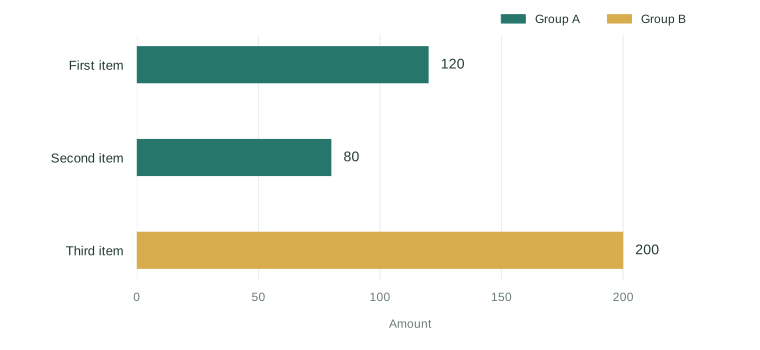
The same three items appear as a table, a chart and a timeline. Change their names, dates and amounts in the profile, then keep the views that help you understand your own work.
Duplicate this folder and name it for the thing it keeps current.
Edit the profile and add files to entries/.
Rename the headings and remove the blocks you do not need.
The list behind the picture
Item
Amount
Status
First item
120
Open
Second item
80
In progress
Third item
200
Done
Amount by item
Scroll chart to explore →
One list powers the table and the chart.
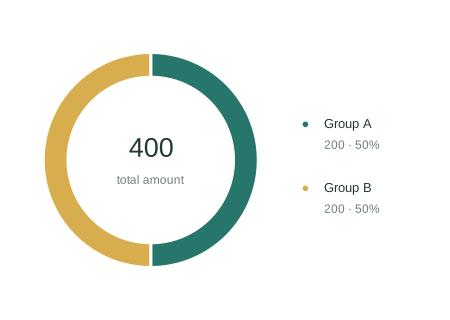
Amount by group
Scroll chart to explore →
A second view of the same source.
Edit Profile.md. The bound rows change; the words around them stay yours.
CONTINUED02 / 03
One file for each entry
The profile holds the shared list; the entries folder holds the individual records. Each Markdown file contributes one row from its front matter, so a new entry can join the document without someone copying its values into another table.
The shipped folder begins with Example Entry, in group A, with a score of 72. Its updated date belongs to that record. Keep the fields that matter to your subject, and let the body of each entry carry the explanation behind them.
The shared profile starts with a subject and an owner, then three items with amounts, dates and states. A short table can show the owner and subject, while the item list supplies the more detailed views. This gives the document a place to say what it is about before asking a reader to interpret the individual records beneath it.
Dates and states have different jobs in the example. The first item is open, the second is in progress and the third is done. Their start and due dates provide the ends of a timeline; their amounts provide the bars. Keep those distinctions when adapting the folder, so a change to a deadline does not get confused with a change to the work itself.
Create one entry file per thing you want to track.
Keep the field names consistent across the entry files.
Use the folder inventory to see which files were added or changed.
Keep the subject and owner visible at the top of the profile.
The supplied entry
Entry
Group
Score
Updated
Example Entry
A
72
Sep 02, 2026
CONTINUED03 / 03
Follow a number back to its source
Some views read the profile directly. Others read a dated capture written by Starter Refresh, the definition that names the source and the shape of the data. A binding with a star selects the newest capture by filename; the key after it selects a list inside that file.
The refresh changes the bound rows while the chart titles, table headings and surrounding prose remain yours. Keep the capture views if you need collected or computed figures. If the folder itself contains everything you need, the Starter explains which refresh and capture blocks you can remove.
The supplied calculation counts three items and two that are not done, adds their amounts to 400, and groups those amounts into A and B. The goal of 500 is a value written into the example. This is a useful distinction when reading the page: a measured total comes from the records, while the target expresses the comparison you chose to make.
The definition editor presents the sources, calculated values and output tables as a form, with the rows produced by each step alongside them. You can examine that sequence before changing it. The morning then has a clear record to report: a profile edit, a new entry, a watched page’s changed text or a new capture. When nothing moved, the run remains in Receipts without a document change.
Describe your own source and required figures in Starter Refresh.
Choose the public pages you want watched and remove the example page.
Turn on Night Shift and inspect the first shift while it runs.
What each part of the Starter keeps
Part
What it carries
Profile
Subject, owner and the shared list of items
Entries
One record per Markdown file
Starter Refresh
The source and the figures to calculate
Data captures
Summary totals and amounts by group
Folder inventory
File names, sizes, modified dates and digests
Start with a working document, then make it yours. Change the profile, add an entry, and see the same data become a table and a chart.
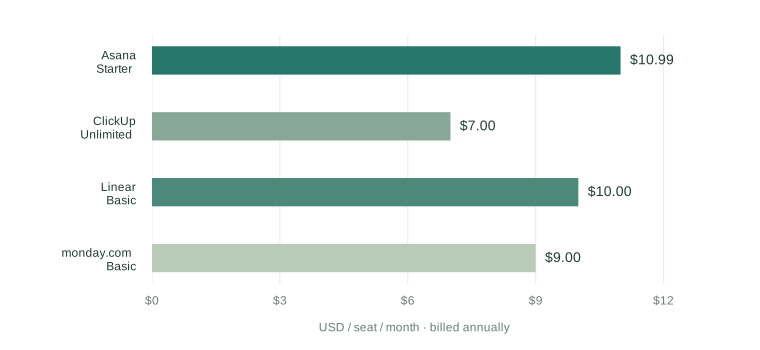
These four entry prices were recorded on September 2, 2026, at annual billing. Keep the tier, billing period and captured page beside each number.
A changed pricing page is a reason to read the source again. Review the reported change before updating the recorded price.
Name the competitors and features your team compares.
Keep a capture of the pages behind the comparison.
Keep the tier with the number
Product
Entry tier
Recorded price
Asana
Starter
$10.99
ClickUp
Unlimited
$7.00
Linear
Basic
$10.00
monday.com
Basic
$9.00
First paid tier, side by side
Scroll chart to explore →
USD per seat / month, billed annually. Recorded sample values; not a live price comparison.
A watched page changes. The comparison and the captured evidence stay close enough to inspect.
CONTINUED02 / 03
Record what comes with the tier
A price needs its conditions beside it. The first capture records free-tier limits and notes where paid plans have seat minimums. These are the sample notes from September 2, 2026; they describe that read of the pages, not a promise about today’s offers.
The companion Competitors file also carries a feature matrix. Its “our product” column is explicitly a made-up example, so replace it and the comparison rows with your own market. Keep the published tier, the billing period and the evidence together as you refine the comparison.
Company and product can be separate names. The sample lists monday.com as the company and monday work management as the product, while its entry tier is Basic. Keeping all three prevents a comparison from quietly changing products when a company offers more than one service. The same record has room for a regional price, a free-tier restriction or a seat minimum that affects the reading.
The example matrix uses the states yes, no, planned and partial. Its rows include a free tier, a timeline, offline documents, approval of AI changes, a public API and self-hosting. These are prompts for choosing your comparison dimensions, not verified claims about Flow. Replace the made-up product and assess the capabilities you actually intend to discuss with your team.
Record the product and entry tier with each price.
Keep seat limits and billing conditions in the comparison notes.
Replace the example matrix with the capabilities your team needs to compare.
Notes from the September 2 capture
Product
Recorded condition
Asana
Free Personal tier for up to 10 seats
ClickUp
Free Forever tier with storage limits
Linear
Free tier with a 250-issue limit
monday.com
Free for two seats; paid tiers have seat minimums
CONTINUED03 / 03
Keep the evidence of a change
The captures folder can hold a dated note, a screenshot or a PDF of a pricing page. The Night Shift inventories those files, while the watched public pages are compared with the previous night. The Briefing can show the text that changed without treating every change in page markup as news.
A reported price change is the start of a review. Read the source, update the recorded price in Competitors when appropriate, and keep any capture you want to revisit. If a watched page cannot be reached, the Briefing names the failure rather than filling in a price.
The supplied capture is titled “Pricing pages, first read” and is dated September 2, 2026. It records what each public page said when the watch began. A later note can sit beside that first read, giving the comparison a history beyond a single nightly diff. Screenshots and PDFs belong in the same folder when you choose to keep that evidence.
Watching a competitor involves both its record and its source. Add the company and tier to Competitors, add a column to the feature rows you use, and name the pricing page in the watch list. You can also watch a public changelog or status page. Each fetch has a receipt, and the retained comparison remains something your team reads and updates deliberately.
Add the same pricing URL to the competitor record and the watch list.
Save evidence you want to keep in a dated capture.
Update the comparison after reviewing the source change.
Sources named in the example watch
Company
Watched public page
Asana
asana.com/pricing
ClickUp
clickup.com/pricing
Linear
linear.app/pricing
monday.com
monday.com/pricing
Keep named pricing pages, a comparison table and captured evidence together. Return to the source changes that deserve a closer look.
Billing and Onboarding are on track in this example week. Platform needs approval for a pinned runner image, while Search is waiting for Platform’s performance fixture.
The blocker connects the two updates. Keep this week’s progress, next week’s work and the unresolved decision together.
Platform: approve the pinned runner image.
Search: obtain the fixture before measuring the batched write.
Milestones that matter next
Milestone
Due
State
Annual plans in checkout
Sep 05
On track
Signed builds on new runner
Sep 08
Blocked
Search rebuild under 30 s
Sep 12
At risk
Release 2.4
Sep 30
Planned
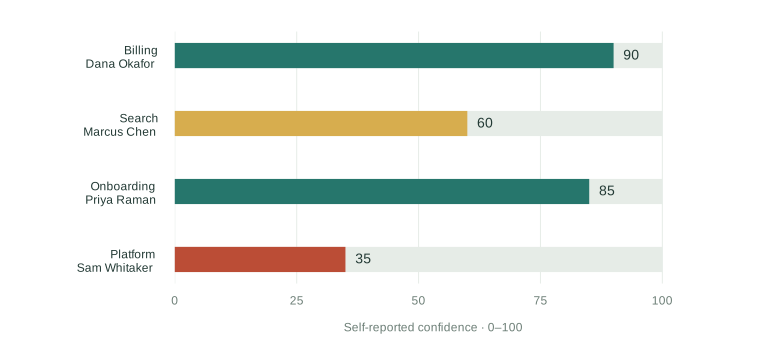
Confidence in landing the quarter
Scroll chart to explore →
Self-reported confidence from the example team’s update files.
Platform’s runner needs approval. Search is waiting on the performance fixture. The dependency stays visible.
CONTINUED02 / 03
Keep the update with its author
The sample week has four update files. Dana’s Billing update records annual-plan pricing and seat counts in receipt emails; Priya’s Onboarding update describes a beta walkthrough with two of its three flows measured under a minute. Their status rows keep those explanations beside the confidence numbers.
Each author records this week’s progress, next week’s work and a blocker in their own file. The updated date is part of the roll-up, so an old report remains visible instead of silently looking current. The manager can read the shared page and return to the individual update when more context is needed.
Confidence is self-reported on a scale from zero to 100. Dana records 90, Priya 85, Marcus 60 and Sam 35. Those numbers are accompanied by status and explanation: green means on track, amber marks risk, and red marks work that is blocked or slipping. The chart is a compact entrance to the update, while the sentences say what the number means.
The next-week field keeps a specific piece of work beside each status. Dana is preparing the dunning emails and in-app banner. Priya is folding survey feedback into the second onboarding flow and shortening its copy. These details make the roll-up useful for a meeting: the team can move from the shared picture to the actual next step without requesting a second report.
Keep one update file per person and remove the supplied examples when adopting the folder.
Rewrite the three update sentences as the week changes.
Check the updated date before relying on a status.
Example updates on record
Author
Area
Updated
Dana Okafor
Billing
Sep 01, 2026
Marcus Chen
Search
Aug 31, 2026
Priya Raman
Onboarding
Aug 31, 2026
Sam Whitaker
Platform
Sep 01, 2026
CONTINUED03 / 03
Put the quarter beside the week
Plan holds the quarter’s milestones, each with an owner, start date, end date and state. The weekly updates explain the work behind that plan. In the example, Search’s rebuild takes 48 seconds on the 40,000-note vault against a 30-second target, and its next measurement depends on the Platform fixture.
The timeline reads its dates from Plan; the team table reads the update files. Change the record that owns the fact, and the bound view follows it. A shared folder uses the same arrangement: everyone edits their own file, while one Mac runs the Night Shift and records the changes.
The plan also separates completed work from work still ahead. The walkthrough is marked done, annual plans are on track, the search rebuild is at risk and signed builds are blocked. Dunning and Release 2.4 remain planned. These states are part of the supplied Q3 example; they are not fresh progress reports or a promise that the later milestones have already shipped.
A new teammate joins this structure with a new update file, which becomes a row in the roll-up and a bar in the confidence view. A changed milestone stays in Plan with its owner and dates. The next Briefing can then identify whose file changed and show the exact difference, leaving the meeting to resolve the blocker or decision rather than reconstruct the update.
Keep milestone ownership and dates in Plan.
Name the dependency in the blocker instead of hiding it inside a confidence score.
Review the changed files before the weekly meeting.
The rest of the example quarter
Milestone
Owner
Window
State
Onboarding walkthrough to beta
Priya Raman
Aug 03–28
Done
Signed builds on the new runner
Sam Whitaker
Aug 24–Sep 08
Blocked
Dunning sequence live
Dana Okafor
Sep 07–25
Planned
Release 2.4
Sam Whitaker
Sep 15–30
Planned
Bring individual updates into one status document. Confidence, milestones and blockers remain connected to the people’s own update files.
Included in Flow Base Scroll inside to take over
Flow / Flow GuideJob Search.mdIllustrated preview
Job Search
July–September 2026 · Example applications
The next conversation
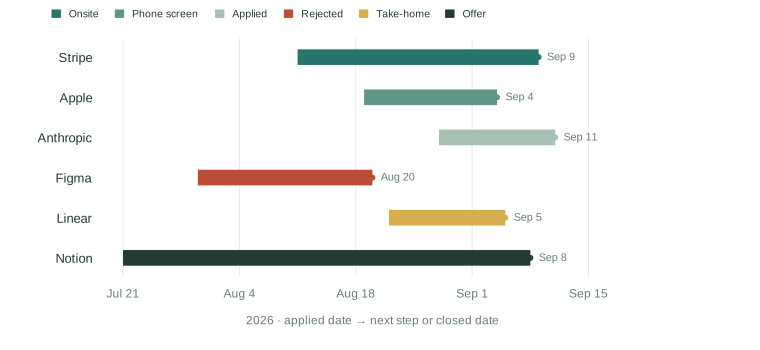
There is an offer from Notion to decide on September 8 and an onsite loop with Stripe on September 9. The decision date comes before the onsite loop. Keep both dates in view as you plan the next conversation.
Prepare questions for each session in the Stripe loop.
Scope the Linear take-home to one flow and a page of rationale.
Update the stage and next date after each conversation.
The next move
Company
Next step
Date
Apple
Hiring manager call
Sep 04
Linear
Submit take-home
Sep 05
Notion
Decide on offer
Sep 08
Stripe
Onsite loop
Sep 09
From application to next step
Scroll chart to explore →
Each timeline ends at the next recorded date; color identifies the stage.
A stage changes in Applications.md. The timeline and tracker follow the same record.
CONTINUED02 / 03
Prepare the work around the calls
The example prep list records two completed foundations: a portfolio updated with two 2026 case studies, and three references already contacted. The take-home template is still in progress. Deciding a compensation range and writing questions for each Stripe session remain open in the supplied record.
Keep this preparation beside the applications instead of scattering it across separate reminders. The same Applications file holds both lists, so a changed stage can be read alongside the work needed for the next step. The sample statuses describe this example search and are yours to replace.
The role name remains part of each application. Stripe and Notion are listed as Senior Product Designer, while Apple, Anthropic and Linear are Product Designer roles; the closed Figma application was for Staff Product Designer. Preserving the level and title keeps the search history readable, especially when several companies use similar titles for different kinds of work or when a role changes during the process.
The source notes give the next conversations their own context. Stripe’s portfolio review went well and the loop has four sessions. Apple’s note is to ask about the team’s design-system ownership. Linear’s exercise is scoped to one flow. Keep these notes with the next step so preparation responds to the particular conversation rather than becoming an identical checklist for every company.
Prepare the compensation range before the recorded offer deadline.
Write questions for each session rather than one generic interview list.
Keep the take-home focused on one flow and a page of rationale.
Preparation in the example search
Preparation
Status
Portfolio: two 2026 case studies
Done
Three references contacted
Done
Take-home template
In progress
Compensation range
Open
Stripe session questions
Open
CONTINUED03 / 03
Keep the version you sent
The supplied resumes folder starts with one base version. Its guide describes a short summary, experience with specific results and two selected case studies. A tailored version changes the opening summary and selected work while keeping the rest of the record consistent.
Keep one file per tailored version, named for the company it went to. The folder inventory makes that version visible beside the application. Careers-page watches add another source of context: a changed public page appears as changed text in the Briefing, ready for you to inspect.
The base resume describes four experience entries, most recent first, with three bullets for each and a number in every bullet. It also keeps skills to a line of tools and practices and education to degree, school and year. These are the sample’s writing constraints, intended to keep the base coherent while the opening and selected case studies change for a particular role.
The application record should survive a rejection or withdrawal. The example keeps Figma’s closed application with its date and note about a level mismatch, instead of deleting the row. The retained stage makes the timeline honest about the whole search. For active applications, keep updating the next date after each conversation, and add the public careers pages you want to follow to the watch list.
Keep the base resume and save tailored versions as separate files.
Update the application’s stage, next step and next date after a call.
Mark a closed application Rejected or Withdrawn and keep its history.
What the base resume carries
Section
The supplied structure
Summary
Three lines: role, years and distinctive strength
Experience
Four roles, most recent first, with specific results
Selected work
Two case studies with links
Skills
Tools and practices in one line
Education
Degree, school and year
Follow each application from the day you applied to the next conversation. Keep the role, stage, resume and follow-up in one place.
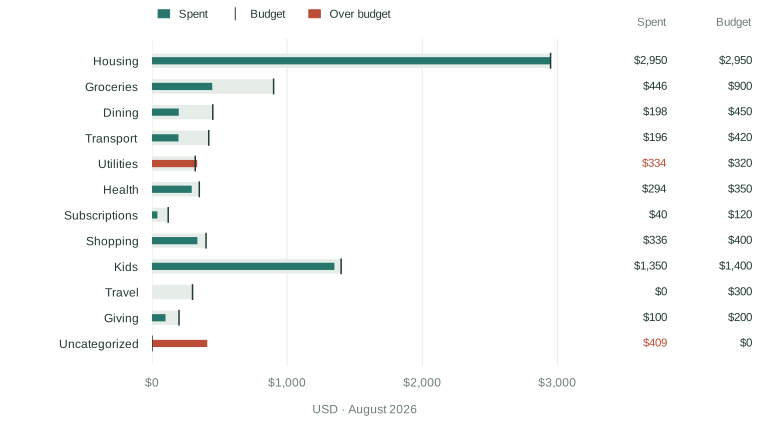
The example household spent $6,652 in August against a $7,810 budget. Utilities reached $334 against a $320 limit, and $409 remains uncategorized.
Understand those transactions before treating the category picture as complete. The category rules are part of the document, so you can inspect and change them.
Review the transactions no categorization rule caught.
Add a merchant rule in the budget profile when needed.
Drop the next statement into this folder to extend the record.
A closer look
Category
Spent
Budget
Utilities
$334
$320
Uncategorized
$409
Not set
Groceries
$446
$900
Kids
$1,350
$1,400
Spent against budget
Scroll chart to explore →
Actual spending and monthly limits in USD. Uncategorized spending stays visible.
$409 is still uncategorized. Review it before treating the category picture as complete.
CONTINUED02 / 03
Keep the plan beside the spending
Budget Profile is the household’s plan: expected monthly income, a savings target and a limit for each category. The sample uses a $9,800 monthly income and a 20% savings target. Its budget rows remain separate from the statement totals, so changing a limit does not rewrite what was spent.
The profile also carries merchant rules. They compare a pattern with each statement description, without regard to letter case, and the first matching rule decides the category. Income and Savings have their own roles in the refresh, while unmatched spending stays visible for review.
Put a specific merchant rule before a more general one when both could match the same description. The sample groups several grocery merchants under Groceries and several recurring services under Subscriptions. You can read those choices in the profile rather than inferring them from a colored bar. Adding a budget category also adds its planned limit to the document, even before new spending appears in it.
A savings rate and a transfer to savings are different observations in this example. The rate compares income received with spending; the separate savings figure follows money explicitly moved to savings. August shows a 32.1% rate and $1,500 moved. Keeping both in view helps explain the month without assuming that every dollar not spent has already been transferred to a separate account.
Set the category limits and savings target in Budget Profile.
Add a merchant pattern when an uncategorized transaction needs a rule.
Run the refresh after changing a rule to see where the transaction moves.
Selected monthly limits from the example plan
Category
Monthly budget
Dining
$450
Transport
$420
Health
$350
Subscriptions
$120
Travel
$300
CONTINUED03 / 03
Follow a statement through the month
The supplied statements folder contains made-up checking exports for July and August 2026. Budget Refresh reads the files beside the document, applies the profile’s rules and writes a dated summary. The monthly chart, cumulative spending line and merchant table read that summary rather than requiring figures to be entered again.
The inventory keeps the statements on record. If Flow notices a new statement while it is open, the page can redraw then; otherwise the night picks it up. The next Briefing identifies the file and any change to the profile, while the original statements remain on this Mac.
The latest month found in the statements sets the month shown in the current summary. The month-by-month chart retains spending grouped by month and category, while the cumulative line shows how the latest month built up. Those views answer different questions: a category comparison locates a limit, the monthly history gives context and the running total shows when spending accumulated.
The merchant table collects the twelve largest merchant totals for the month. The refresh trims trailing store numbers and state codes when grouping descriptions, so several purchases can be read together without replacing the categorization rules. The uncategorized list remains a separate place to inspect what no rule caught. Return to the statements when a total needs explanation, then change the profile rather than editing the displayed summary.
Replace the two example exports with your own statement files.
Keep a date, description and amount in the CSV, or use debit and credit columns.
Check the merchant totals and uncategorized lines after the refresh.
The views and the questions they answer
View
What to read
Month at a glance
Spending, income, savings rate and transfers
Categories against budgets
Actual spending beside each planned limit
Last months, stacked
Spending by month and category
Cumulative spending
How the current month accumulated
Merchants and uncategorized lines
Where totals came from and what needs a rule
Turn statement files into a budget you can revisit. Compare spending with your own category limits and keep unclassified transactions in sight.
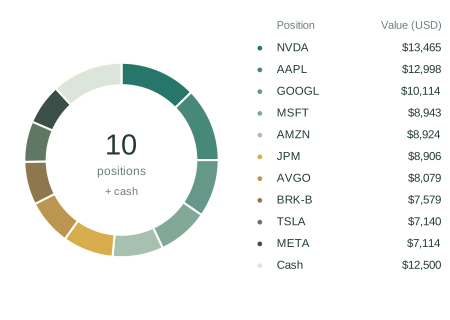
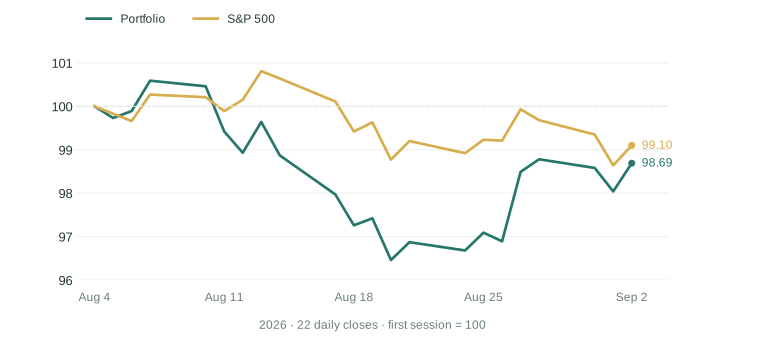
The illustrative portfolio holds ten stocks and $12,500 in cash, for a recorded total of $105,761. Over the sample month it fell 1.3%, compared with 0.9% for the S&P 500.
Both lines start at 100. Read the capture’s date, then use the allocation and benchmark together to put the figures in context.
A month with context
Series
One month
Portfolio
−1.3%
S&P 500
−0.9%
Where the money sits
Scroll chart to explore →
Ten holdings and cash. Source values are rounded.
A benchmark beside your return
Scroll chart to explore →
August 4–September 2, 2026. Both series start at 100.
A dated sample, not live market data or an investment recommendation. Your holdings and decisions stay yours.
CONTINUED02 / 03
The position behind the total
Holdings records the symbols, shares and average costs that define the illustrative portfolio. The priced holdings table adds the capture’s closing prices, market values and gains. Keeping those two records distinct makes it possible to see what was declared and what the dated price capture added.
The excerpt below shows four positions from the September 2 sample, sorted by recorded value. These lots are examples, not a suggested allocation. When you make the document yours, the symbols and quantities belong in Holdings; the dashboard’s bound rows are redrawn from those records and the next capture.
The average cost is recorded per share, while the priced value covers the whole position. A holding’s gain is measured against that cost rather than against the start of the chart’s one-month window. The bought date is kept for the owner’s record. Keeping these meanings explicit avoids treating the date, a daily move and the total gain as interchangeable descriptions of performance.
The sample also records cash beside the positions. It contributes to the portfolio total and appears in the allocation donut, while the gains bridge follows the positions from their cost basis to their market value. When changing the input file, update the shares and average cost together if that is what the underlying record requires, and inspect the next capture before interpreting the revised totals.
Edit shares and average cost in Holdings when a position changes.
Keep the capture date beside the priced values.
Use the declared-holdings table to inspect the inputs before reading the gain figures.
Selected illustrative positions · September 2, 2026
Symbol
Shares
Average cost
Recorded value
NVDA
60
$216.61
$13,465
AAPL
40
$267.61
$12,998
GOOGL
30
$350.34
$10,114
MSFT
18
$424.82
$8,943
CONTINUED03 / 03
Keep the wider context dated
The complete document places macro indicators and headlines beside the holdings. Its sample follows the S&P 500, Nasdaq Composite, VIX, Treasury yield, dollar index and several other markets. The focus holding has a candlestick view, while the gains bridge follows the movement from cost basis to market value.
Portfolio Refresh and Headlines Refresh are separate definitions, with captures kept in the data folder. The document also watches the named Federal Reserve press-release page. A source change is something to read with its date and receipt; it is not an instruction to change a position.
The macro table names the indicator and its symbol, followed by the recorded level and daily and monthly changes. The Treasury yield has its own three-month sparkline. These views provide a wider setting for the holdings, but their units differ: an index level, a yield and a commodity price should be read with their own labels rather than compared as equivalent numbers.
Headlines retain the publisher’s title, source and date beside the relevant holding. They are kept separately from the price capture, which lets you inspect where a headline came from without treating it as a calculated portfolio result. In the supplied example, both captures are dated September 2, 2026. A later refresh adds a new dated record and redraws the blocks that read it.
Set the benchmark, focus holding and followed indicators in Holdings.
Inspect the dated portfolio and news captures when a figure needs context.
Review watched-page changes in the Briefing and keep investment decisions separate.
Context kept beside the portfolio
Source or view
What it contributes
Holdings
Declared lots, cash, benchmark and focus position
Portfolio capture
Prices, allocation, indexed history and macro data
News capture
Publisher headlines, sources and dates
Federal Reserve watch
Changed text from the named press-release page
Data-folder inventory
The dated captures available to inspect
Keep holdings, allocation and a benchmark in one document. Inspect the capture behind each number and bring your own portfolio records.
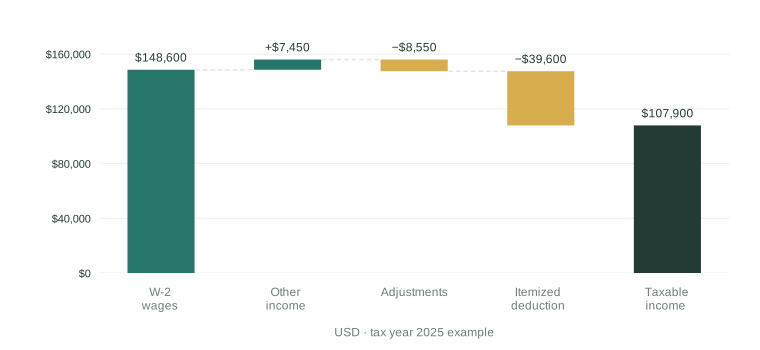
This illustrative 2025 federal estimate works from the profile and example W-2 to taxable income. Itemized deductions total $39,600, above the $31,500 standard deduction, so the example uses the itemized route.
The assumptions remain part of the calculation. Keep the estimate beside the records and questions you bring to your tax preparer.
Confirm every W-2 and 1099 has arrived.
Gather property-tax and mortgage-interest statements.
Review standard versus itemized deductions.
Tax in each modeled bracket
Bracket
Income
Tax
10%
$23,850
$2,385
12%
$73,100
$8,772
22%
$10,950
$2,409
How income becomes taxable income
Scroll chart to explore →
Wages and other income, less adjustments and the itemized deduction. USD.
An illustrative federal estimate, not a filing result. Keep the assumptions and source records ready for professional review.
CONTINUED02 / 03
Keep deductions beside the forms
The illustrative 2025 deduction comparison adds mortgage interest, state and local taxes, and charitable contributions to an itemized total of $39,600. Medical expenses add nothing in this sample. The document keeps these inputs visible beside the standard-deduction alternative rather than showing only the final taxable-income number.
Each W-2 has its own file in the inputs folder, with box values in its front matter. The shipped employer and wages are made up. The forms table reads those records, while the refresh combines them with Tax Profile and the selected year’s figures to produce the estimate.
The example separates wages from withholding. Box 1 contributes wages of $148,600, and box 2 records $21,940 of federal withholding. The comparison with estimated tax after credits produces the example refund; the withheld amount is a payment already recorded, not the calculation of tax owed. Keeping the form’s boxes visible makes it possible to follow that distinction through the estimate.
Income that does not come on a W-2 belongs in the profile. The example includes interest, dividends and capital gains there, along with filing status, dependents and deduction inputs. A 1099 is not entered as another W-2 file. Keep the source forms beside the recorded assumptions, and use the actions list to track which records have arrived and which questions remain for the filing review.
Copy the example W-2 once per employer and replace the sample box values.
Keep income and deduction assumptions in Tax Profile.
Check that the forms and the estimate use the same tax year.
Illustrative 2025 itemized deductions
Input
Amount
Mortgage interest
$14,200
State and local taxes
$21,800
Charitable contributions
$3,600
Medical amount above the threshold
$0
Itemized total
$39,600
CONTINUED03 / 03
Write down what the estimate leaves out
This example is federal only. It does not compute state income tax, alternative minimum tax, net investment income tax or self-employment tax. It also treats income at ordinary rates, including gains and dividends that may receive different treatment on a completed return; the document names that simplification explicitly.
The year’s figures live in a separate file with their sources. Watched IRS pages can reveal changed text, but reviewing that change and updating the figures remain visible steps. Keep those assumptions with the estimate and the open actions so your preparer or filing software can determine the actual return.
The supplied omissions also identify deductions for qualified tips, overtime and car-loan interest that need additional source amounts or eligibility details. They are listed as items outside this calculation rather than silently treated as completed work. The document therefore gives a reviewer a defined boundary: which figures were used, which calculations were simplified and which questions must be answered somewhere else.
The actions table has its own status record. In the example, checking that forms arrived and maxing the HSA are marked done; gathering property-tax and mortgage-interest statements is in progress, and deciding the deduction route remains open. Those statuses can be changed in Tax Profile independently of the estimate. The next view should make both the calculation and the unfinished preparation readable together.
Review the listed omissions before relying on the estimate.
Check a changed IRS source before updating the stored figures.
Bring unresolved forms, deductions and assumptions to the filing review.
Boundaries named by the sample estimate
Item
Treatment in this example
State income tax
Not calculated; the state is kept in the profile
Long-term gains and qualified dividends
Included at ordinary rates in the estimate
AMT, investment-income and self-employment taxes
Outside the calculation
Qualified tips, overtime and car-loan interest
Additional inputs or eligibility details needed
The completed tax return
Determined by the preparer or filing software
Gather source records, profile assumptions and a rough federal estimate. See the calculation before taking your questions to a tax professional.
Included in Flow Base Scroll inside to take over
Seven illustrated previews. 24 documents in Flow.
Keep the data current with Base. Add local Overnight notes with Pro.
Published measurements from earlier Flow builds. A baseline to inspect.
22.3 msp95 search · 10,000 notes
1.1 sFirst index · 10,000 notes
$0.00425One observed cloud run
7Daytime Agency actions
Search measurements: Apple Silicon, published production evidence. Cloud sample: 105 input + 149 output tokens; one run, not a price guarantee. Historical measurements; not new Flow 1.7 benchmarks. Read the measurements
START WITH THE ROUTINE
ADD THE INTERPRETATION.
Keep data current for free. Add model-powered work with Pro.
Start with 10 Pro Days. No credit card. Counted on days you use Pro.
FLOW BASE
A useful place to begin.
Free foreverNo account. No expiry. No private format.
For Mac OS. Base is free forever. 10 Pro days included. No credit card to use.
FLOW PRO
Intelligence for the continuing work.
$10 / monthOr $96 / year · one person, your own Macs
Everything in Base
Local Overnight notes on changed work
Model-assisted data-definition drafts
Model-powered Ideas actions, daytime Agency and analysis
Local or configured cloud models; provider usage is separate
Or pay in-app when ready.
Night Shift model work stays on your Mac. Configured cloud models remain a separate choice for daytime work.
When Pro ends, model-powered actions stop. Your files stay readable and editable, with no watermark or export wall. Read receipts remain accessible. Read our promise and licensing details.
A FEW THINGS WORTH KNOWING.
Which Macs can run Flow?
macOS 26 or later, on Apple Silicon or Intel. Flow is distributed directly as a signed and notarized Mac app. Download availability follows the release cut. Read the technical requirements.
Is there a free version after the trial?
Yes. Base remains free forever for reading, writing, search, organization, charts and export. Deterministic Living Document jobs and Morning Briefing are included. Model-powered Agency, definition drafting and Overnight notes require Pro, including when the model runs locally.
What leaves my Mac?
Local model inference stays on your Mac. A configured cloud action sends selected content to the provider you chose. Named public-source jobs make network requests; optional public Web Lookups are separate and off by default. Flow does not upload usage analytics or automatic crash reports to Orionfold, and needs no recurring online licence check to keep working. Help → Copy Diagnostics lets you inspect a summary before you choose to share it.
Can a team evaluate Flow?
Start with the same owned files, visible routes and inspectable changes. The enterprise page describes evaluation patterns, evidence requirements and rollout considerations. Read the enterprise guide.
Does Flow need to stay open?
No. Night Shift’s background helper can run with Flow quit. Your Mac needs to be available, plugged in and idle within your chosen window. If it misses a window, catch-up can run once after wake.
Does everything run locally?
Night Shift model work uses a local model. Jobs can read the public pages you name. During the day you can choose configured local or cloud model routes. Flow does not silently turn a local night into a cloud-model call.
Will it change my whole document?
You define the jobs and bindings. Night Shift updates declared parts, marks its changes and records receipts. Keep records your review; Revert restores the selected part. Your own later edits are protected from a blind rollback.
Product facts and press contact
Flow is a native Mac app from Orionfold LLC, built by Manav Sehgal in Sacramento, California. Its revision-scoped verifiable AI agency is patent pending. For product or press questions, contact [email protected]. Read the founder’s approval story.
Can I bring my own files?
Yes. Flow works with readable Markdown files and folders. Start with your documents or copy an included example, then adapt its sources and Jobs.

 Research Brief