What This Chapter Helps You Do
This chapter helps you check the trust, runtime, approval, and license controls that matter before you run real business work.
The Operator Story
Before Northstar Automation Studio lets Relay touch client work, Maya does one final admin pass. She checks whether the app is running locally, which runtime will carry model work, what license state is saved, and where approvals will appear. She also wants to know where to inspect cost and failures after a run.
This is not security theater. It is the practical setup a small business needs before trusting an agentic tool. Relay can run tasks, use tools, route approvals, record costs, and publish artifacts. A local-first app still needs rules.
Trust in Relay is built from visible controls. Settings tells you what is configured. Inbox tells you what needs a person. Monitor tells you what happened. Costs tells you what usage means. Together, these screens form the control loop.
This control loop should be easy to explain to a non-technical owner. Before work starts, check Settings. While work waits, check Inbox. After work runs, check Monitor. When spend matters, check Costs. That simple path is stronger than a long policy nobody follows.
What This Part Of Relay Is For
Relay is local-first. Product state lives locally, and Relay does not send customer data to Orionfold. That does not mean every action is risk-free. A runtime may call a model provider. A workflow may use tools. A premium pack may depend on license state. A publish action may target a real remote.
Settings is the preflight screen for those decisions. Use it before real customer work, before premium pack changes, before publish actions, and before changing runtime defaults.
The trust question is not “Can I click this?” The better question is, “Do I understand what will happen if I click this?”
This is especially important for local-first software. Local state reduces one kind of risk, but it does not remove operational risk. A local app can still call a provider, write files, start a workflow, or publish to a configured destination.
Walk The Screen Like An Operator
Open Settings. Start with the summary so you can see the current instance state.
What you should notice:
- Summary cards for the local app.
- Links or sections for runtime, license, and other controls.
- Top chrome that helps you confirm where you are.
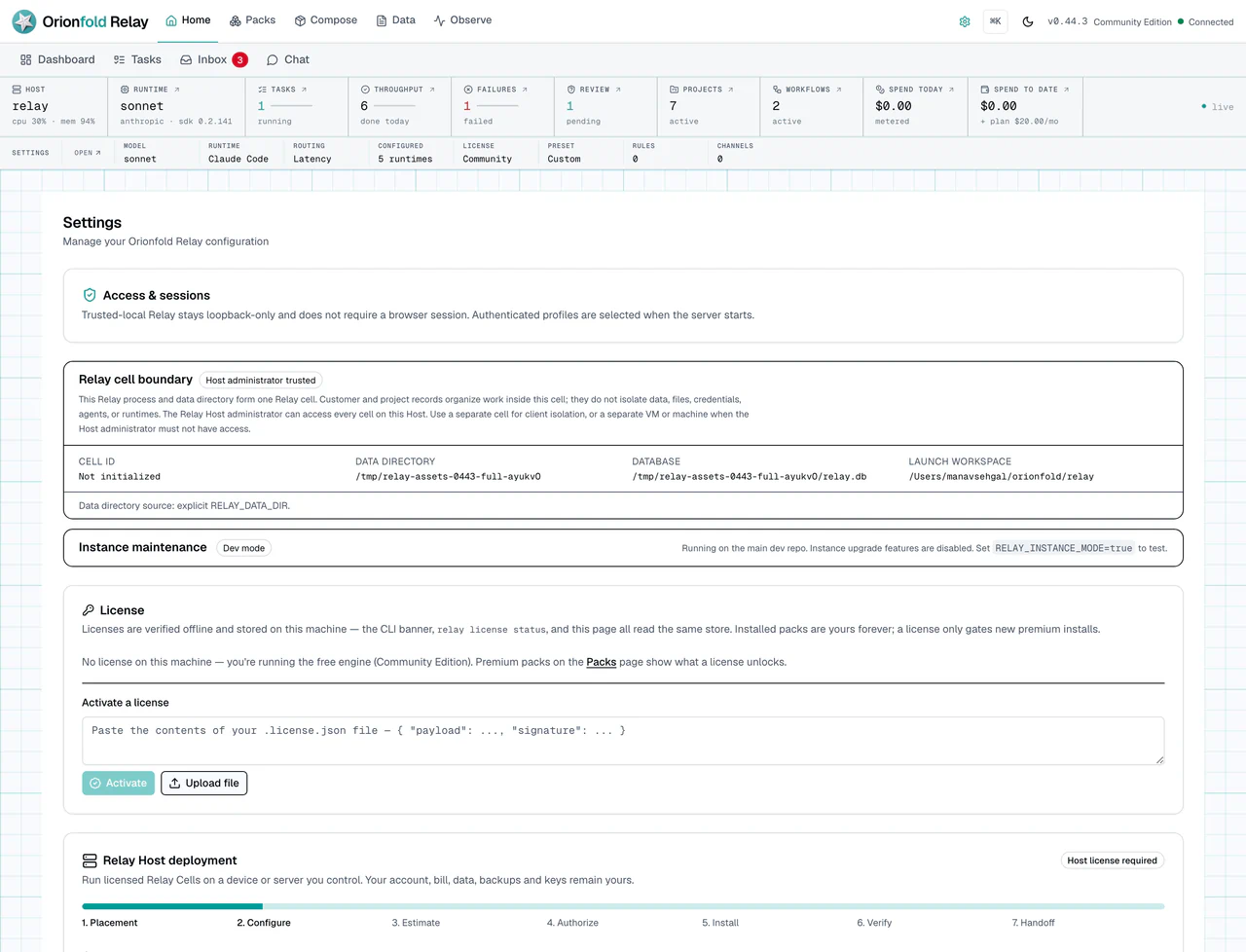
The summary is where the admin story starts. It should show enough state to orient you before you change anything. In a dev repo, dev mode may be visible. In a real local install, you should still be able to understand license, runtime, and control posture from Settings.
Start with Relay cell boundary. Relay shows the active Cell id when one has
been initialized or supplied by a managed Host. It also shows the data
directory, SQLite database path, and launch workspace. A direct dev or npx
process may not have a managed identity. Relay shows that Cell as not
initialized while keeping its real data boundary visible.
This Relay process and data directory form one Relay cell. Customer and project records organize work inside this cell; they do not isolate data, files, credentials, agents, or runtimes. The Relay Host administrator can access every cell on this Host. Use a separate cell for client isolation, or a separate VM or machine when the Host administrator must not have access.
A complete Cell includes its process or container, private network, route, data directory, database, files, identity, secrets, license, logs, resource budget, backups, and runtime policy. Settings reports facts Relay can prove today. Relay Host deployment adds a browser journey for one local Host. It also offers a clearly labeled Cloud Server Preview and a separate DigitalOcean guided beta link. Preview is simulation. The guided beta is a tested manual install on a customer-owned server; it is not in-app cloud provisioning. Remote multi-Host management is outside this surface.
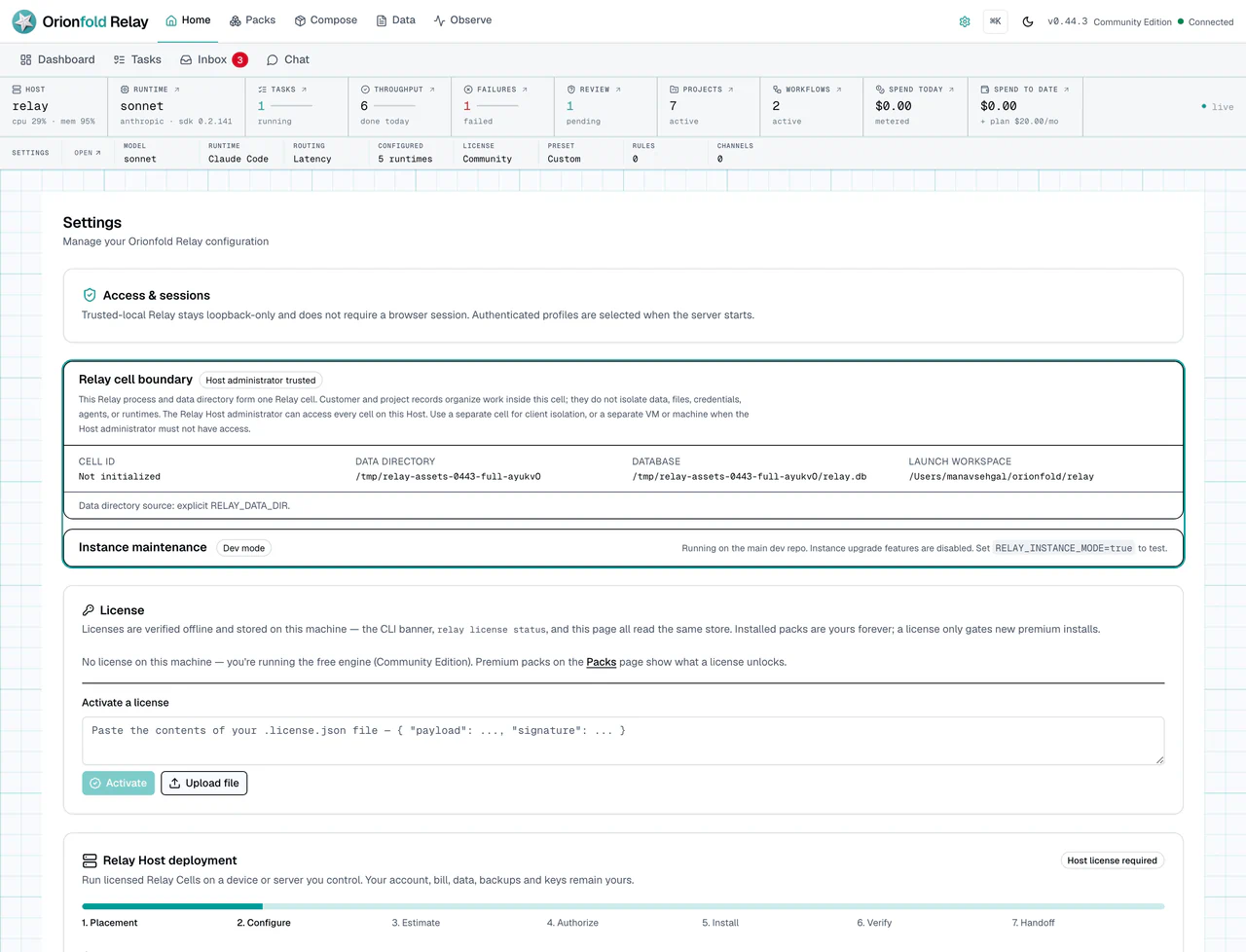
In plain terms, a Host is the laptop or server where Relay runs. A Cell is one complete Relay instance on that Host. A customer, project, or folder is only a way to organize work inside a Cell. It does not give that customer a separate database, secret store, login boundary, or backup.
A Host Supervisor is the local control program for one Host. It can create, start, stop, restart, retain, or purge Cells on that Host. Recovery is a separate verified capability. Upgrade, rollback, and transfer are not enabled. A Host Supervisor is not a Fleet Controller. A Fleet Controller could coordinate several Hosts. It would ask each Host Supervisor to act instead of reaching directly into a remote Cell.
For example, if Server A coordinates Relay running on Servers B, C, and D, then B, C, and D are the Relay Hosts. Server A is a Fleet Controller. The current Host Supervisor remains local to one Host and does not claim that remote multi-Host authority.
Choose the setup that matches who owns and administers the machine:
- Relay for you on your laptop. Run
npx orionfold-relay. npm starts one local Relay process, which is your one Cell. You do not need a container registry or managed-Host supervisor for this simple setup. - Several customers on your laptop. Your laptop is the Host. Give each
customer a separate Relay process and
RELAY_DATA_DIR; the managed Host CLI uses one separate OCI Cell container per customer. A customer folder inside one Relay process is not enough. Every customer on the laptop must trust you as its Host administrator. - Several customers on your server. Your server is the Host. The npm-installed Host Supervisor verifies and pulls the signed Relay Cell image from an OCI registry. It runs a separate Cell for each customer. Each customer reaches only its Cell through signed-in access. You remain the trusted Host administrator.
- Relay on your customer’s own server. That server is the customer’s Host, even when it runs only one Cell. The customer owns the machine and data. You may help manage it only with authority the customer grants.
The distribution rule is simple: npm supplies the direct local Relay path and the Host control software. The OCI registry supplies the managed Cell runtime image. The Cell image never contains the Host supervisor and cannot be switched into Host mode.
The supervisor stays separate from normal Relay startup. An administrator can
use relay host ... or the equivalent relay-host .... The licensed Settings
journey uses the same supervisor contracts. Relay does not start privileged
Host control from a Cell. The supervisor keeps a dedicated
~/.relay-host/host.db registry. It stores opaque ownership, resource, state,
and receipt facts. It does not store prompts, documents, credentials, or Cell
database content. Production create operations require Docker, Cosign, a signed
Host license, and an immutable ghcr.io/orionfold/relay-cell@sha256:...
reference. Cosign checks the public image signature and SLSA provenance
anonymously; GitHub CLI login is not required for a managed Host. The public
v0.44.9 image
is available at index digest
sha256:42bea7a0a65bf799ddbbc4a078667f256400c5cca0fe682c07ab68f2bf5c3cd5.
The Settings lifecycle journey is implemented and documented as a current
surface. Host mutations require a signed Host license. Cloud Server Preview is
a deterministic simulation rather than a purchased or running VM.
In Settings → Relay Host deployment, compare the two placements before you configure anything. Local device means Relay uses a machine you already control. The displayed provider bill is $0. Power, network, operator time, model usage, and recovery storage remain yours. Cloud server preview shows a dated cost range and runs the journey against a fixed simulation. It stores no provider token. It creates no VM, DNS record, firewall rule, or provider charge.
The separate DigitalOcean guided beta card links to the customer guide. Its validated baseline is one Ubuntu 24.04 x64 Droplet with 2 vCPU, 4 GiB RAM and 80 GiB disk, with Relay bound to loopback behind authenticated HTTPS. The customer creates and administers the server, firewall, hostname, TLS, backups, recovery keys, and model credentials. Relay does not request a provider token or create the Droplet. Inside Relay on that server, choose Local device because the Droplet is the local Host. Use Cloud Server Preview only to compare a dated planning simulation.
The baseline proves Relay and lightweight managed Cells. It is not a production sizing promise for a local LLM. Use BYOK hosted inference or size a separate private Ollama, LM Studio, or LiteLLM server for its own workload. Follow Run a Relay Host on DigitalOcean for the firewall, service, first-admin, license, Cell, recovery, update, and complete teardown sequence.
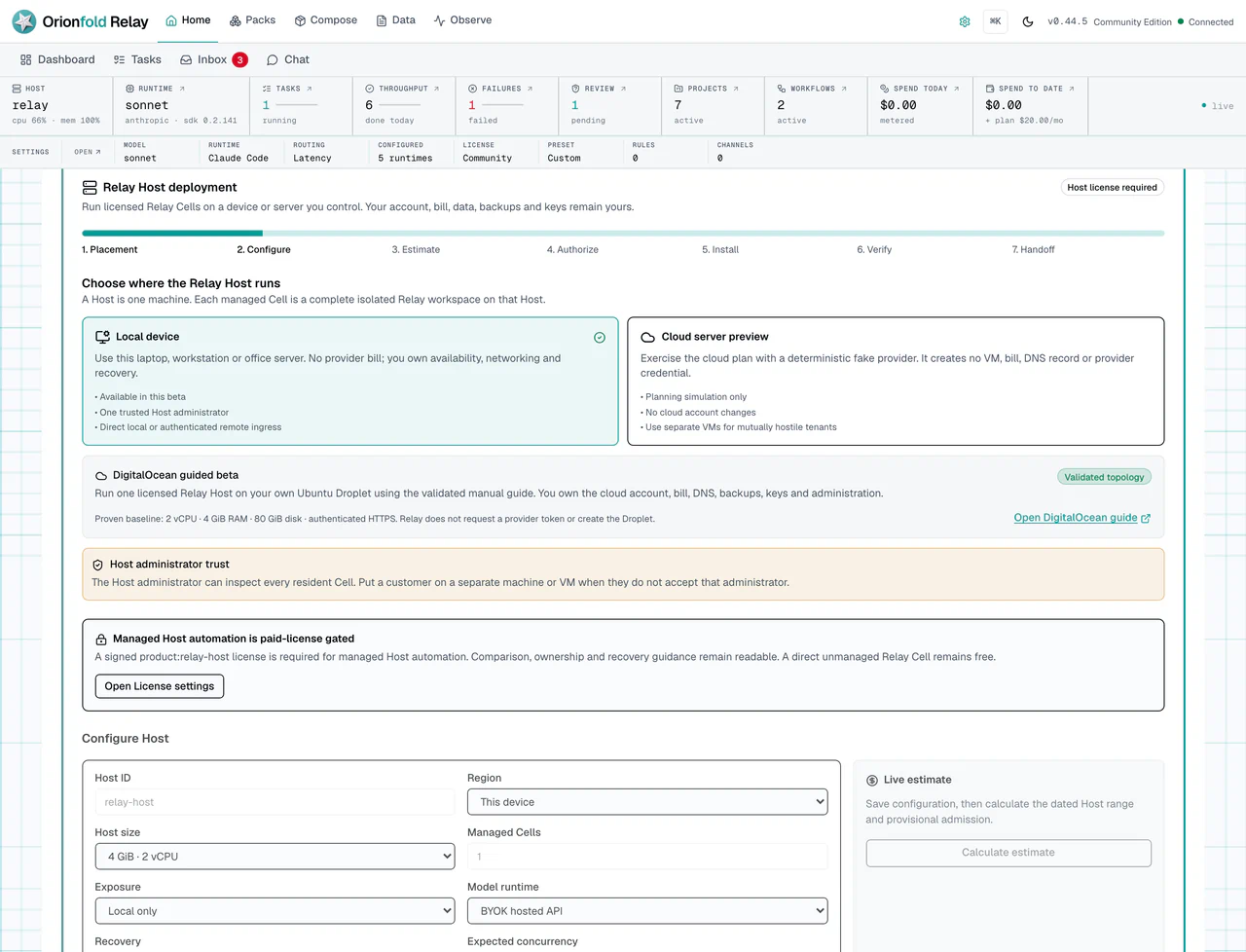
A signed Host license allows configuration and mutations. Save the Host ID, region, size, Cell count, exposure, model runtime, recovery profile, and expected concurrency. Then calculate the estimate. Run preflight, confirm the exact plan, and install. A change to cost or capacity clears the old estimate and approval. Relay will not reuse stale consent.
After installation, create Cells with opaque IDs rather than names or email addresses. Relay pins each Cell to the accepted public image digest and shows content-free lifecycle receipts. Start, stop, restart, and remove while retaining data use the same Host supervisor as the CLI. Permanent purge requires typing the exact Cell ID. Create and verify encrypted recovery first: the Host deployment surface links to Encrypted Recovery rather than accepting a file path from the browser. Upgrade, rollback, transfer, and Fleet control are shown as unavailable until Relay has verified domain contracts for them.
The two downloads come from the same Relay release, but they are not the same bundle. The npm download is small because your machine supplies Node, installs the needed packages, and supplies the operating system and native libraries. The Cell image includes a pinned Linux runtime so the same managed Cell can run the same way on every supported Host.
The 0.44.3 npm package used for the original size comparison is about 2.92 MB compressed and 10.62 MB
unpacked. The arm64 Cell image is about 130.14 MB. This is not a fair installed-size
comparison: the npm number leaves out Node, installed packages, and host
runtime requirements that are already on the machine or downloaded during
setup. The OCI image carries that runtime closure itself, and unchanged image
layers can be reused between releases.
Choose An Exposure Profile
Relay starts in trusted-local mode on 127.0.0.1. This personal-laptop path
does not ask you to sign in because the listener is not reachable from another
device. Relay refuses a non-loopback hostname in this mode instead of printing
a warning and continuing.
For a LAN, VPN, or tailnet, start private-authenticated with the exact origin
your browser uses. For internet access, start remote-authenticated behind an
HTTPS ingress, keep Relay bound to loopback, and configure its server-side
ingress credential. The full
commands and boundary are in
Relay Host ingress and administrator access.
Before the first authenticated sign-in, run relay auth bootstrap on the Relay
server. Enter its 15-minute, single-use credential on the setup screen, choose a
password, and save the recovery codes Relay shows once. Each password sign-in
approves one named, 12-hour browser session. Open Settings → Access &
sessions to review or revoke browsers and inspect content-free access receipts.
Using a recovery code rotates the password and recovery set and revokes every
old session.
Do not confuse those administrator recovery codes with Cell disaster recovery. Access codes help an administrator regain browser access to a Cell that still exists. Settings → Encrypted recovery protects the whole Cell when a laptop, VM, or disk is lost. Configure a customer-owned key and separate destination on the Relay server. The page reports only whether each is present and how it was configured; it never returns key bytes or raw paths.
Create encrypted bundle writes a live-safe database backup, access state, files, settings, license data, and the Cell secret root into an authenticated encrypted artifact. Relay decrypts and checks the candidate before calling it ready. Verify latest repeats the integrity checks without changing live state. Run restore drill also extracts the file archive in an isolated directory. A real restore remains an offline CLI operation and refuses a non-empty data root.
Keep the recovery key away from both the Cell and its bundles. If the key is lost, Orionfold cannot recreate it. A configured local-directory destination also does not create a durability or recovery-time promise; copy it to storage you own and periodically prove a destroyed disposable Cell can be rebuilt. See Relay Cell encrypted recovery for the commands and failure contract.
Choose by operating model, not by device location. One personal Cell can use npm on a laptop or a cloud server. A managed Host can use OCI Cells on a laptop or a server when you need one repeatable, signed, isolated runtime per customer, with clear storage, network, user, resource, upgrade, and rollback controls. If you only run one personal Cell, you do not need the OCI image.
If two customers must not trust the same Host administrator, place them on different VMs or machines. Separate Cells on one Host protect their application data from ordinary cross-Cell access, but they still share the Host administrator and the Host’s failure boundary.
Open the Dashboard section before a team adopts Home as its daily operating view. Each switch controls one local module. The default visible set includes attention, autonomous activity, installed Packs and apps, projects and workflows, recent outputs, recently launched features, and an active Operator Workshop when one exists. Pricing coverage, provider readiness, and activation progress are available but start hidden.
Smart ordering uses deterministic local signals. Urgent and active work, failures, recent activity, and recency can move a visible module earlier. Needs attention, Autonomous activity, and Recent outputs form the stable top row while they are visible, so the default opening scan stays predictable. If you prefer a fixed order, turn Smart ordering off. Restore defaults resets the visibility and ordering preferences.
Hiding a module does not dismiss its work. If hidden modules contain unresolved urgent items, Home displays a notice with a path back to Dashboard Settings. This guard matters when an admin simplifies Home for a team: fewer cards should not create silent operational blind spots.
Open Runtime next. Check which model paths are configured before you run chat, tasks, workflows, or AI-assist actions.
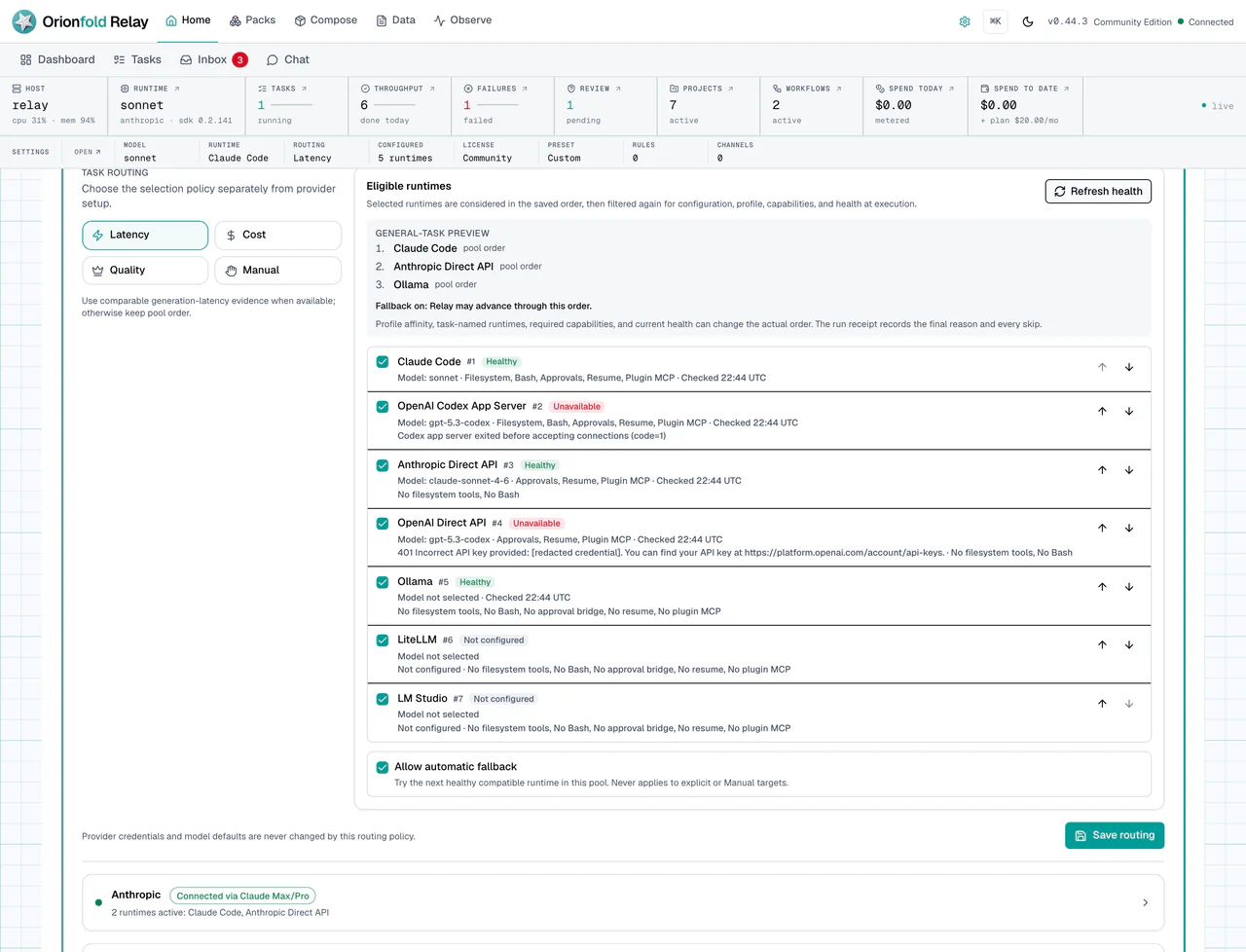
Runtime is a trust setting because it controls where model work goes. A local path, a provider path, and an SDK-backed path do not carry the same cost or data-flow expectations. Read this screen before a buyer demo, a client workflow, or a budget-sensitive run.
Run The Work Carefully
Open License. Check saved license state before installing or updating premium packs.
What you should see:
- Offline license verification state.
- Premium install and update access when a valid license is saved.
- Existing installed premium content remains installed even if a license later expires.
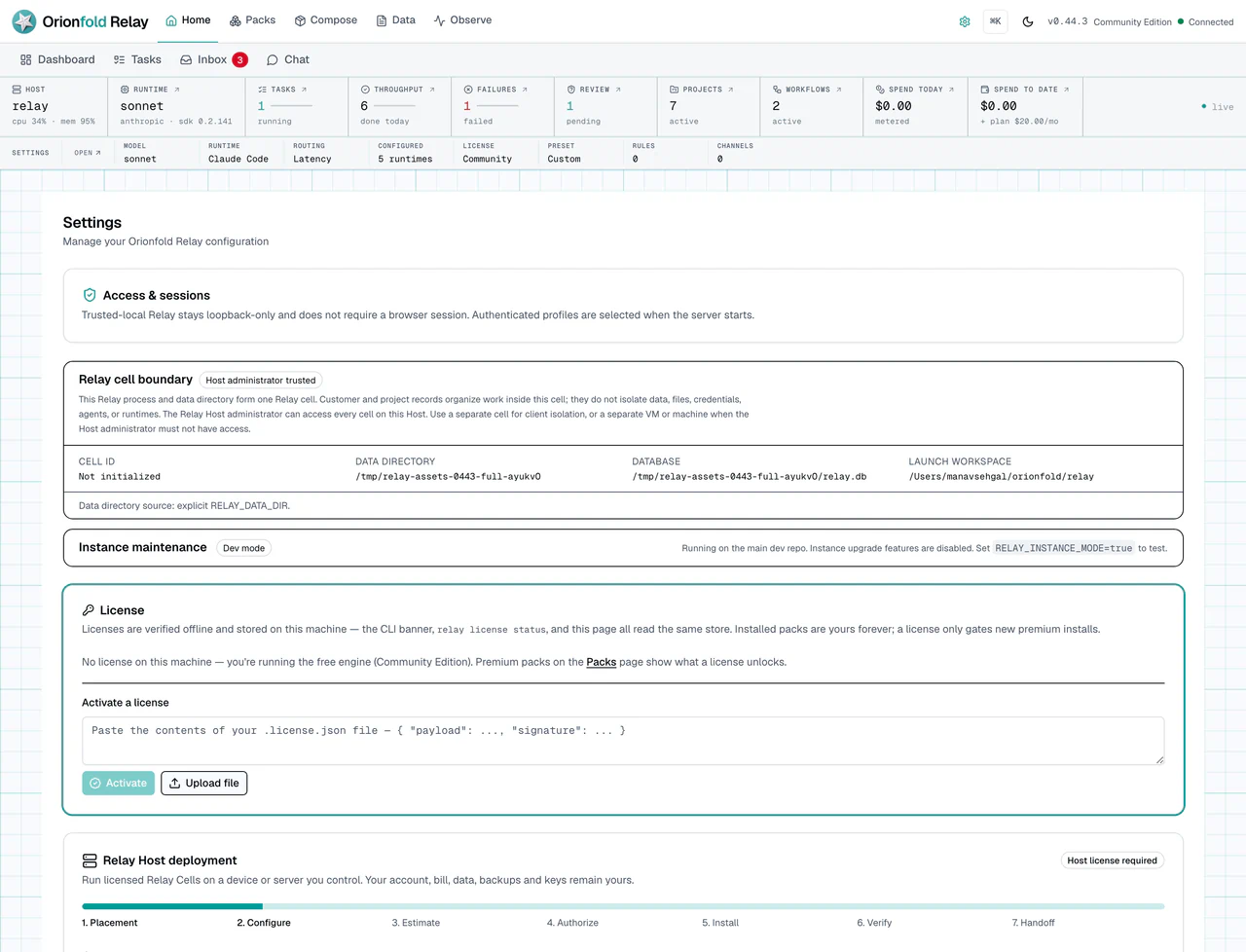
The license panel matters because it explains pack behavior. If a premium install is blocked, this is where you look. If a license expires, installed local content should remain installed. The gate applies to new premium installs and updates, not to the local work you already have.
While work runs, use Inbox as the human control point.
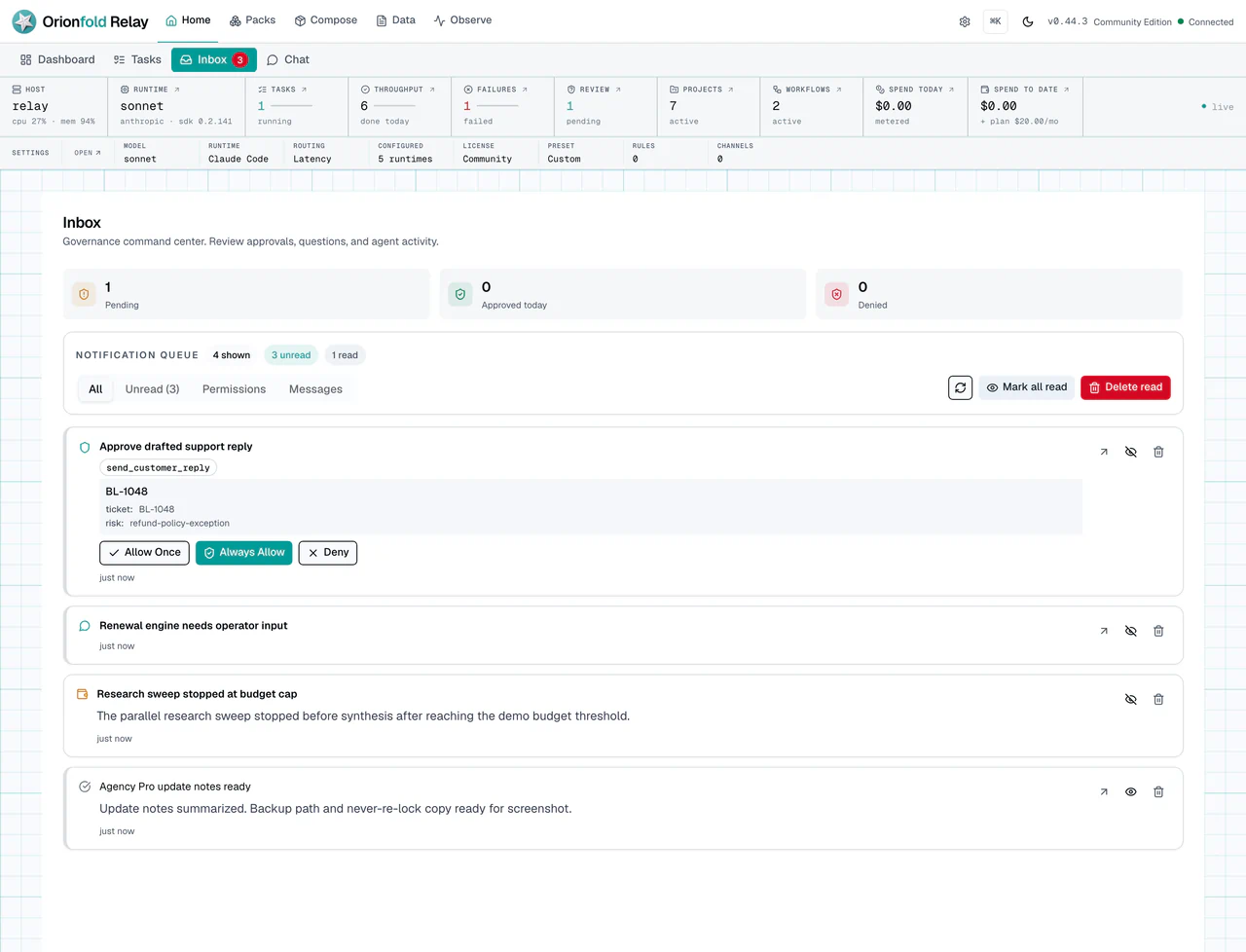
Inbox shows approvals, workflow questions, budget alerts, and other operator decisions. If an approval is waiting, answer it before starting more work. A waiting approval is not clutter. It is Relay asking for human judgment.
After the action, use Monitor to inspect execution.
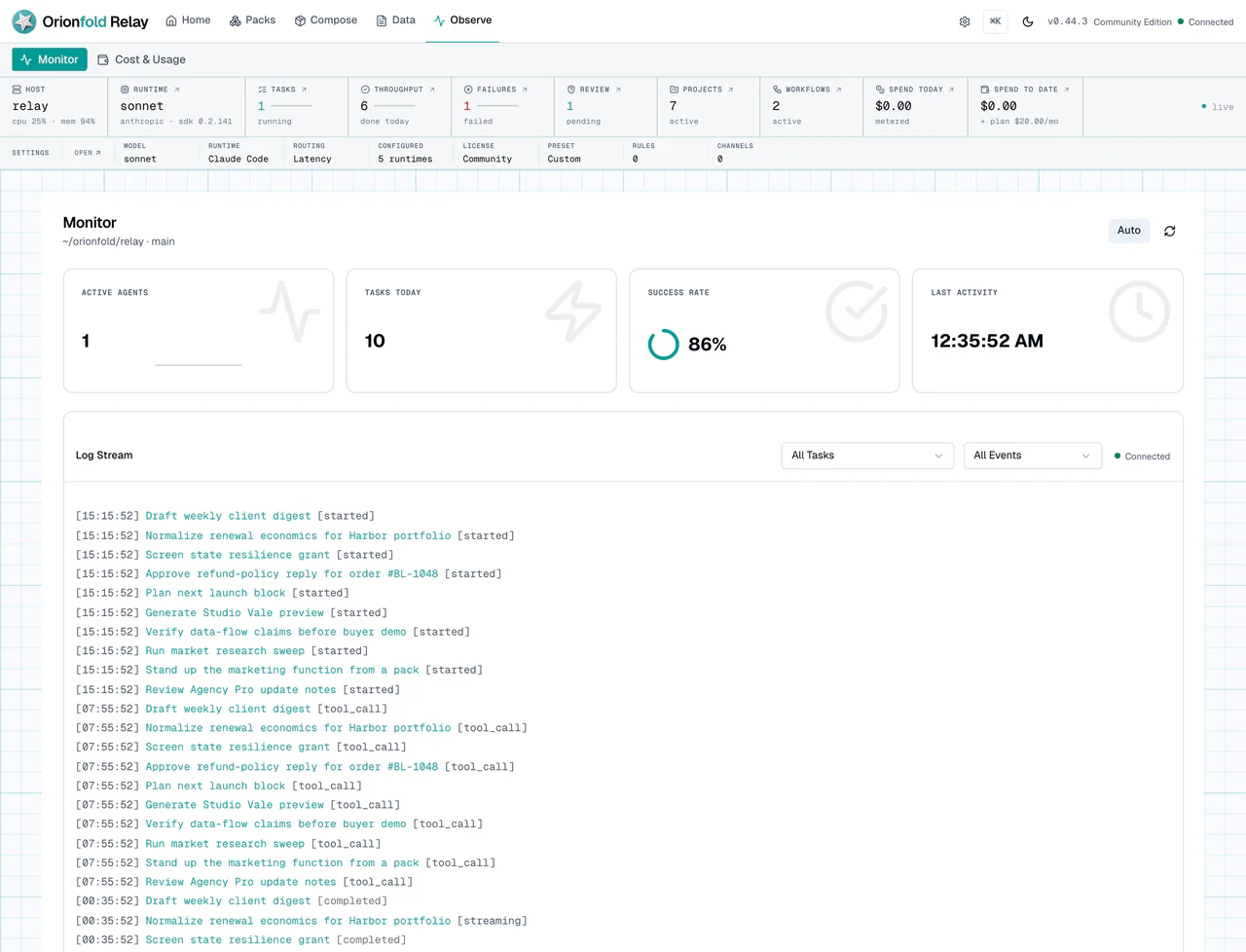
Monitor is where you check what ran, what failed, and which runtime or provider identity Relay can show. If a run fails, this is the evidence screen.
Finally, open Cost & Usage from the Observe section to understand spend and usage.
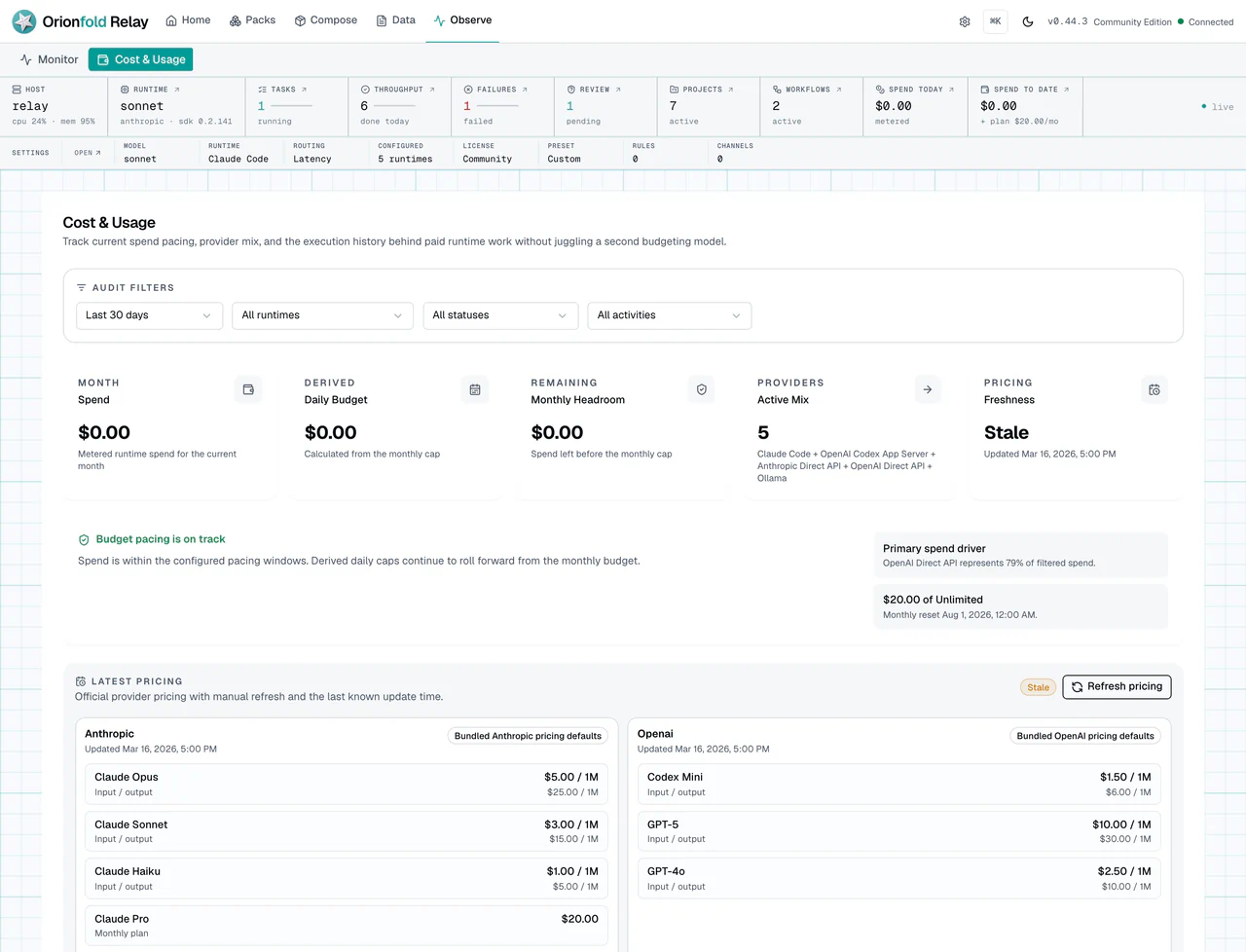
Costs completes the trust loop. It helps separate local-free usage, metered usage, budget context, and attribution. Use it before changing budgets or rerunning expensive work.
Together, these screens create a review rhythm. Settings defines intent. Inbox captures judgment. Monitor records execution. Costs records usage. A team can use that rhythm in a weekly review or before a buyer demo.
What To Do When The State Looks Wrong
If a runtime is missing, do not run client work until you configure or select the right path. A missing runtime is not a prompt problem.
If an approval is waiting, answer it from Inbox before you start more work. A second run may duplicate the first issue.
If a premium pack action is blocked, fix the license state or keep using the installed version you already have.
If a run fails, use Monitor and Costs to understand the effect before retrying. Keep the error text.
If a publish target or network bind points outside your local loopback setup, stop and review the destination. Local-first does not mean every configured action stays private.
If a customer row or project folder is being used as proof of client isolation,
stop. Review the Relay cell boundary in Settings. Move the client to a distinct
process/container and RELAY_DATA_DIR; use another VM or machine when the
current Host administrator must not be trusted with that client’s cell.
If trust settings look correct but behavior still surprises you, capture the evidence. Save the settings state, the Inbox item, the Monitor row, and the Costs view. Those four pieces make a useful bug report or internal review note.
If Home looks incomplete, check Dashboard Settings before treating the data as missing. Confirm that the module is visible and that the underlying screen contains the expected records. If Home reports urgent work inside hidden modules, either restore that module or establish another explicit review route.
What This Changes In Daily Work
The daily habit is to run a trust loop around important work. Settings before action. Inbox during action. Monitor after action. Costs when spend or budget matters.
For an admin, this creates a simple review path. For an agency, it makes client work explainable. For an SMB owner, it lowers the risk of silent automation.
Relay gives you local control, but control only helps when you use the screens that show it.
The best outcome is a calm operating habit. People should not need to ask where approvals live or why a model path was used. The answer should be visible in the product.
Where To Go Next
Next, return to the chapter for the work you plan to run: packs, projects, chat, workflows, tables, costs, or web publishing.